We research every product we recommend. We may earn a commission from the links on this page.
Electronics › USB Cables

USB-C Cable Length and Charging Speed: What the Wire Gauge Actually Determines

We compare published specifications and marketplace data. We do not test these products.

USB Cable Resistance Chokes Charging Speed Over Distance
Photo by https://kaboompics.com/ on Pexels

A 6-foot USB-C cable carrying 5 amps loses measurable voltage before it reaches your device. The power doesn’t vanish — it turns into heat inside the wire. How much heat depends on two things you can’t see from the outside: the thickness of the copper conductors and how far the current has to travel. Here’s how that physics plays out across cables rated from 60W to 240W, and what it means for the charger sitting on your desk right now.

Affiliate disclosure: This article contains affiliate links. We may earn a commission if you buy through them, at no extra cost to you.

Everything we compared
4 picks

How we picked

We do not measure cable resistance or voltage drop. Judgments rest on published power ratings, wire-gauge specifications, and marketplace performance patterns.

Wire gauge, not price

Conductor thickness determines how much voltage drops over distance. A low-gauge number means thicker wire and lower resistance at any given length.

Length against rated wattage

Short cables tolerate thin wire. Long cables carrying high current need thick conductors to prevent measurable voltage loss and heat buildup.

Power rating clarity, not vague claims

A stated wattage implies minimum wire thickness. Cables without power specs give no guarantee about conductor size or safe current capacity.

Real-world failure modes, not ideal conditions

Marketplace data reveals which cables overheat, which chargers negotiate poorly, and which combinations deliver rated power without throttling or damage.


The Physics Inside Every Cable

Copper wire resists current. Not much — fractions of an ohm per foot — but current amplifies that resistance into real power loss. The formula is P = I²R: power lost equals the current squared times the resistance. Squaring matters. A cable carrying 3 amps through a given resistance wastes 9 units of power. The same cable carrying 5 amps wastes 25. That’s not a proportional increase. It’s nearly triple.

Resistance itself scales two ways. Longer cable, more resistance — linearly. A 6-foot cable has six times the resistance of a 1-foot cable built with the same wire. And thinner wire has more resistance per foot. A typical 24 AWG conductor — the kind in basic USB-C cables — runs about 0.026 ohms per foot. Step up to 20 AWG, the thicker wire in high-power cables, and it drops to roughly 0.010 ohms per foot.

Put those together. Five amps through 6 feet of 24 AWG wire: 0.156 ohms total resistance, 0.78 volts of drop, 3.9 watts lost as heat. The same 5 amps through 6 feet of 20 AWG: 0.060 ohms, 0.3 volts of drop, 1.5 watts wasted. The thick-wire cable delivers 2.4 more watts to your device from the same charger. That’s not a rounding error — it’s the difference between a laptop charging while you use it and one that slowly drains despite being plugged in.

Why Short Cables Sidestep the Problem

At 1 foot, even thin wire barely matters. One foot of 24 AWG carries 0.026 ohms. At 3 amps — the current a 60W charger at 20 volts pushes — that’s 0.078 volts of drop and 0.23 watts lost. You’d need instruments to detect it. The charger’s rated 60 watts arrives as 59.77 watts. Nobody’s laptop notices.

This is why a short cable rated for modest power can outperform a long cable rated for much more. The 1-foot cable doesn’t need thick conductors because it doesn’t have enough wire to build meaningful resistance. Length is doing the work that gauge would have to do in a longer cable.

The trade-off is obvious: a foot of cable reaches from a desk charger to a laptop sitting next to it, and nowhere else. If your charging brick lives on the floor beside your desk, or plugs into a wall outlet behind furniture, 1 foot is a constraint, not a convenience.

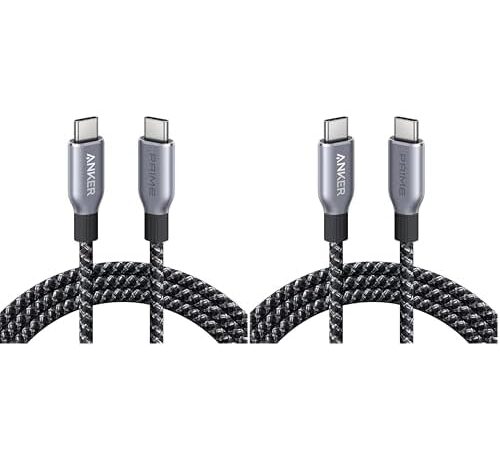
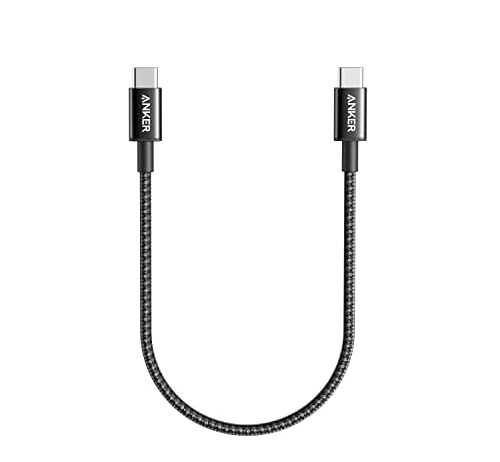
The Anker USB-C cable at 1 foot and 60W exists in the part of the resistance curve where cable physics barely applies. At 3 amps and roughly 0.026 ohms of total conductor resistance, it wastes a quarter of a watt. Your charger’s output arrives almost untouched.

Sixty watts is enough for phones, tablets, and ultrabooks that draw under 45W. It won’t saturate a MacBook Pro’s 96W charger, but that’s a charger limitation unrelated to the cable’s length. For the devices it’s sized for, the short run means the wire gauge genuinely doesn’t matter — there isn’t enough copper to lose anything in.

Long Cables and the Current That Heats Them

Stretch to 6 feet and the math changes. At 5 amps — the current required by any cable rated 100W or above at 20 volts — resistance has real room to accumulate. Whether you feel it depends entirely on how thick the conductors are, and that’s the one spec manufacturers almost never print on the box.

A 240W rating is, indirectly, a wire-gauge promise. USB-C Power Delivery 3.1 requires cables carrying 5 amps to contain an E-Marker chip in the connector — a tiny circuit that tells your charger the cable can handle the current safely. That chip’s presence means the cable passed certification for its rated power, which in turn means the conductors are thick enough to carry that current without excessive voltage drop or dangerous heat. A cable rated for 240W at 6 feet has committed to thicker wire than one rated for 60W at the same length.

But here’s the catch: 100W and 240W cables both carry 5 amps at 20 volts. The difference is that a 240W cable also supports 48-volt negotiation under USB PD 3.1 Extended Power Range, which gets the same wattage with lower current and therefore less resistive loss. If your charger only speaks 20 volts, both cables behave identically in the wire — the 240W rating doesn’t reduce voltage drop at 20V. The thicker gauge still helps, but the premium is paying for voltage headroom your charger may not use.

When the Cable Gets Warm

Heat in a charging cable is not a defect. It is I²R in action — current squared times resistance, converted to thermal energy in the conductor. Every cable carrying current gets warm. The question is how warm, and whether that warmth means anything is wrong.

At 3 amps through a short cable, you won’t feel it. At 5 amps through 6 feet, you will — a gentle warmth along the cable’s length, concentrated near the connectors where contact resistance adds to the total. This is normal. The cable is dissipating 1.5 to 4 watts as heat depending on wire gauge, and that energy has to go somewhere.

What’s not normal: a cable too hot to hold comfortably, or one that gets noticeably warmer over the first few minutes and doesn’t plateau. That pattern suggests either the cable’s conductors are thinner than the current demands, or a connector has developed high-resistance corrosion. In either case, the cable is converting too much of your charger’s output into heat and too little into charge.

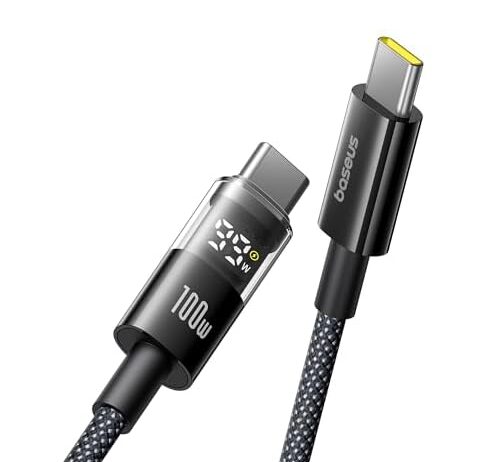
The Baseus 100W cable with its built-in LED display does something none of the others can: it closes the feedback loop. Plug it in and you see the actual voltage arriving at the device end, the current flowing, and the resulting wattage. If your 65W charger is delivering 58W through the cable, the screen tells you. No guessing, no apps, no USB power meters wedged between connectors.

That visibility matters most when you’re diagnosing a slow charge. A phone pulling 15W from a 30W charger could mean the phone is nearly full, or the cable is bottlenecking, or the charger isn’t negotiating the right voltage. The LED narrows it down immediately. At 100W and 5A rated current with zinc alloy reinforced connectors and nylon braiding, the cable itself handles the electrical load. The display is the reason it costs more than a plain braided cable at similar power — you’re paying for the meter built into the plug.

Does a Higher-Wattage Cable Help a Lower-Wattage Charger?

Sometimes. Not the way most people assume.

A 240W cable plugged into a 65W charger won’t charge your laptop at 240 watts. The charger sets the ceiling, always. But the cable rated for 240W almost certainly has thicker conductors than a cable rated for 60W, because it was built to handle 5 amps without excessive heat. Those thicker conductors have lower resistance per foot. Lower resistance means less voltage drop. Less voltage drop means more of your charger’s 65 watts actually reaches the device.

The gain is small in absolute terms — maybe 1 to 2 watts on a 6-foot run. But it’s real, and it compounds: over an 8-hour workday with a laptop that cycles between 60% and 100%, that extra watt or two can be the difference between the battery holding steady and slowly draining. The cable’s wattage rating is a proxy for wire gauge, and wire gauge is what determines resistive loss. Overspecifying the cable doesn’t hurt and might help.

What Length Costs and What Gauge Buys Back

The four cables here span a 6.6x range in length and a 4x range in rated wattage. The interaction between those two numbers is the entire story.

The Anker 1-foot cable at 60W sits where resistance is irrelevant. It delivers what the charger outputs, full stop. The Anker Prime at 6 feet and 240W sits at the opposite extreme — maximum length, maximum current capability, thick enough conductors to keep voltage drop contained at 5 amps. The construction backs that up: upcycled-braided nylon rated for what the manufacturer calls 100-year bend durability, which is a flex-cycle count translated into marketing language. Braided jackets distribute bending stress across many fiber strands instead of concentrating it at one point, which is how cables with internal conductor breakage fail — the wire fatigues at the flex point near the connector, resistance spikes at the break, and the cable that used to deliver 95W now delivers 60W and gets hot at the plug.

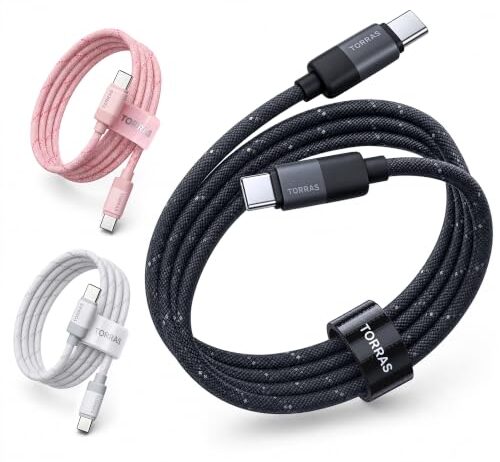
The TORRAS at 6.6 feet and no rated wattage sits in the most common position a buyer actually encounters: a cable long enough to be useful, priced at $6.50 each in a two-pack, braided, compatible with everything USB-C. What you don’t know is how thick the conductors are. Without a wattage rating, there’s no E-Marker requirement, no implicit gauge promise. It might carry 60W cleanly. It might not. At 6.6 feet, the difference between 24 AWG and 20 AWG is 2.4 watts — real enough to feel as heat, not enough to see as a slower charge time unless you’re watching a power meter.

How to Tell Without a Meter

If your cable doesn’t have a built-in display, you can still detect voltage drop indirectly. Charge the same device with a short cable and then with the cable you’re questioning, using the same charger and the same battery level. Watch the estimated time to full. A difference of more than 10-15 minutes on a phone-sized battery points to meaningful resistive loss in the longer cable.

Temperature is a rougher signal but still useful. A cable that’s warm to the touch along its full length at 5 amps is dissipating a few watts — normal. A cable that’s noticeably warm at 3 amps or less is either very thin gauge, very long, or developing a high-resistance fault at a connector.

The most reliable tell is also the simplest: if your laptop says it’s charging but the battery percentage drops during use, your cable is delivering less power than the machine draws. Switch to a shorter cable or a higher-rated one and check again. If the drain stops, the cable was the bottleneck.

FAQ

Does a longer USB-C cable charge slower than a short one?

Yes, but how much slower depends on wire gauge and current. At 3 amps, a 6-foot cable with standard 24 AWG wire loses about 0.23 watts — barely noticeable. At 5 amps, the same cable loses 3.9 watts, enough to slow a laptop charge measurably. Thicker gauge wire (20 AWG) cuts that loss to 1.5 watts at the same length and current.

Why does my USB-C cable get warm during fast charging?

Current flowing through the cable’s copper conductors generates heat proportional to the current squared times the wire’s resistance. At 5 amps through a 6-foot cable, that’s 1.5 to 4 watts of heat depending on wire gauge. Gentle warmth along the cable is normal. Heat concentrated at the connector, or a cable too hot to hold, suggests the wire gauge can’t handle the current being drawn.

Will a 240W cable charge my laptop faster than a 100W cable on the same charger?

Not dramatically, but possibly by a small margin. Both carry 5 amps at 20 volts, but the 240W cable likely has thicker conductors — lower resistance, less voltage drop, slightly more power reaching your device. The gain is typically 1-2 watts on a 6-foot run, meaningful over hours but not obvious in a quick top-up.

How do I know if my cable is causing voltage drop?

Charge your device with a short cable, then the cable in question, using the same charger and starting battery level. If the longer cable adds more than 10-15 minutes to a phone charge, resistive loss is significant. A cable with a built-in LED display can show you the actual delivered wattage in real time. Warmth along the cable’s length under moderate current is another indirect signal.

Do I need a cable rated higher than my charger?

You don’t need one, but it doesn’t hurt and can marginally help. A cable rated for higher wattage typically uses thicker wire, which means less resistance per foot and slightly less power lost as heat. The charger still sets the maximum output — the cable won’t make a 65W charger deliver 100W — but the thicker wire ensures more of that 65W arrives at your device.