
We research every product we recommend. We may earn a commission from the links on this page.
Electronics › Surveillance NVR Kits

NVR Channel Count vs. Actual Recording Resolution — What the Box Doesn’t Tell You

We compare published specifications and marketplace data. We do not test these products.

Network Bandwidth Starves Recording Quality Before Storage Does
Photo by Brett Sayles on Pexels

An 8-channel NVR has eight ports. Plug in eight 4K cameras, and every one of them records at 4K — that’s the reasonable assumption. It’s also wrong more often than most buyers discover before the system is bolted to a wall. The channel count on the box is a port count. Whether those ports can all carry full-resolution video simultaneously depends on a bandwidth ceiling that almost no consumer NVR discloses in its marketing. Here’s what determines your actual recording quality, and how four current PoE systems handle the math differently.

Affiliate disclosure: This article contains affiliate links. We may earn a commission if you buy through them, at no extra cost to you.

Everything we recommend

4 picks

How we picked

We did not install these systems. Judgements come from published specifications, bandwidth math, and owner-reported behaviour.

Channel headroom, not channel count

How many ports sit empty matters more than how many exist. Unused channels are unused bandwidth.

Per-camera bitrate, not resolution alone

A 5MP stream is roughly 40% smaller than an 8MP stream at the same frame rate. Resolution without bitrate context is incomplete.

Variable-load features, not feature count

Pan/tilt tracking and audio add bandwidth that fixed silent cameras don’t. We weighed what each feature costs the shared pipe.

Storage depth, not just capacity

More terabytes extend retention only if the NVR can actually write full-resolution streams. We paired storage against realistic sustained bitrate.


One pipe, every camera

Every PoE NVR has a single aggregate bandwidth ceiling — the total data rate it can receive from all cameras combined. Consumer models typically sit between 80 and 200 Mbps. That number is fixed. It does not scale with how many cameras you plug in.

An 8MP camera streaming H.265 video at a reasonable frame rate needs roughly 4–6 Mbps. Four of them: 16–24 Mbps. Comfortable. Eight of them: 32–48 Mbps. Still within range for most NVRs. But push to sixteen 8MP cameras and you’re asking for 64–96 Mbps before any of them detect motion and spike their bitrate upward.

This is where the distinction between channel count and recording capacity lives. An NVR with sixteen ports and a 100 Mbps aggregate ceiling can physically connect sixteen 8MP cameras. Whether it can record all sixteen at 8MP simultaneously is a different question, and the answer depends on compression codec, frame rate, scene complexity, and whether any cameras are doing something that increases their individual stream size.

H.265 compression is the single biggest variable. It cuts bandwidth demand by roughly 40–50% compared to H.264 for the same visual quality. An NVR running H.265 across all channels can sustain noticeably higher per-camera resolution than the same hardware running H.264. If your NVR supports both and you’re running H.264, you’re leaving resolution on the table.

Why your footage looks worse than your live view

When the combined bitrate from all cameras exceeds the NVR’s aggregate limit, something has to give. Most consumer NVRs prioritise frame rate over resolution — they’d rather show you smooth 15fps footage at reduced pixel count than sharp 4K at 5fps. The result is footage that looks fine on a phone screen and falls apart the moment you zoom in on a face or a plate number.

The system does not warn you. There is no alert, no log entry, no degraded-quality icon. The live view may still look sharp because it’s pulling a separate, lower-bitrate preview stream. The recording stream — the one you’ll need when something actually happens — is the one that got cut.

Variable bitrate encoding makes this worse in bursts. A camera watching an empty hallway transmits very little data. The moment three cameras detect motion simultaneously — a delivery driver, a dog, wind in the trees — all three spike their bitrate at once. The NVR hits its ceiling for thirty seconds, drops resolution on whichever channels it deprioritises, and returns to normal. You won’t know it happened until you review that specific window of footage.

Half-full is a feature, not a limitation

An 8-channel NVR shipping with four cameras is not an incomplete kit. It’s headroom. Four 8MP cameras on an 8-channel system use roughly half the available bandwidth at H.265 rates, leaving a wide margin for bitrate spikes during motion events and room to add cameras later without degrading the ones already installed.

Compare that to a 16-channel system shipping with 16 cameras. Every port is occupied. Every camera competes for the same fixed pipe. If the aggregate bandwidth is 160 Mbps and each 8MP camera needs 5 Mbps at baseline, you’re at 80 Mbps before a single motion event. That’s sustainable — until six cameras detect movement at once and each jumps to 10 Mbps, and suddenly you need 120 Mbps from those six alone while ten others still need their baseline.

The 5MP cameras change this math substantially. A 5MP stream at the same frame rate and compression runs roughly 3–4 Mbps — about 40% less than 8MP. Sixteen of them at baseline: 48–64 Mbps. Even with motion spikes, a 16-channel NVR with 5MP cameras is far less likely to hit its ceiling than the same NVR with 8MP cameras. Lower resolution per camera, but every camera actually records at that resolution all the time. That’s a real trade-off, not a compromise.

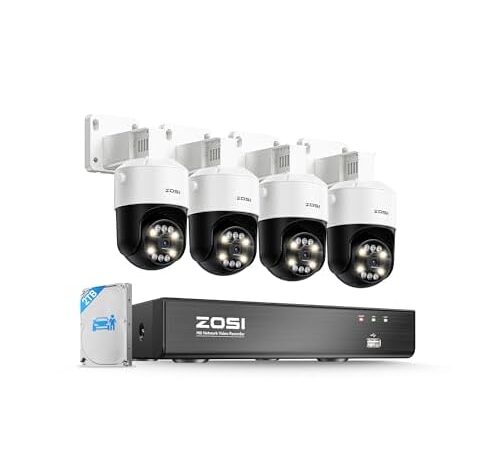
This is the system where the bandwidth math works most comfortably. Four cameras on eight channels means 50% port headroom. At H.265+ compression — a more efficient variant that squeezes streams tighter than standard H.265 — four 8MP cameras need roughly 16–20 Mbps total. Even a conservative 80 Mbps aggregate ceiling leaves four times the required bandwidth.

That margin matters in practice. Starlight colour night vision and human detection both run on-camera, so they don’t add to the NVR’s processing load. Audio recording does consume bandwidth — a small amount per camera, but it comes from the same fixed budget as video. With only four cameras drawing from the pipe, the audio overhead is negligible.

The 2TB drive stores roughly 10–14 days of continuous 4K recording from four cameras at H.265 bitrates. Adding cameras later — up to four more — will cut that retention proportionally but shouldn’t force resolution drops, because the bandwidth headroom is generous enough to absorb the increase. This is the configuration where channel count and recording capacity actually align.

What pan/tilt costs the other cameras

A fixed camera sends a predictable stream. The scene changes, but the frame doesn’t move. A pan/tilt camera with auto-tracking is different — when it follows a person across a driveway, every frame is substantially different from the last. The compression algorithm can’t reuse as much data between frames, so the bitrate jumps.

How much it jumps depends on how often the camera moves and how fast. A slow pan across a static background might add 20–30% to baseline bitrate. A rapid track following someone running past produces frames that look almost unrelated to the encoder, spiking the stream to near its maximum. If four pan/tilt cameras all track motion simultaneously — a car pulling in while someone walks to the door — the combined spike can briefly double the system’s total bandwidth demand.

This doesn’t mean pan/tilt is a bad choice. It means the bandwidth budget has to account for the worst case, not the average. On an 8-channel system with four pan/tilt cameras, the headroom from four empty channels absorbs those spikes. On a fully loaded system, the same spikes would force resolution drops on whichever cameras the NVR considers lowest priority.

Auto-tracking is the feature that changes what a camera asks of the NVR from moment to moment. When the camera is still, it streams like any fixed 8MP camera — 4–6 Mbps at H.265. When it pans to follow a person, that figure can double briefly. The spotlight alarm adds further data when it triggers. Two-way talk layers an audio stream on top of everything else.

All of these features are individually modest in bandwidth cost. Stacked together across four cameras during a busy moment — a delivery, a visitor, a passing car — they produce the highest peak demand of any system in this set. The saving grace is the same as the ZOSI fixed-camera system: four cameras on eight channels means 50% of the ports are open, and the bandwidth headroom that comes with those empty ports absorbs the variable spikes without forcing resolution compromises on any channel.

The 2TB drive fills faster during high-activity periods because tracking generates larger files than static surveillance. Continuous 4K recording from four pan/tilt cameras with audio will consume storage roughly 15–25% faster than four fixed cameras at the same resolution.

Sixteen cameras, two ways to fill the pipe

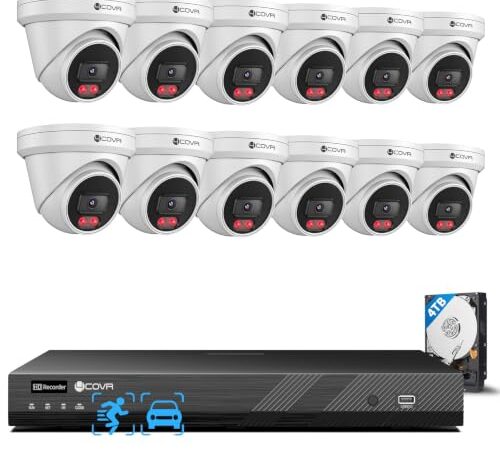
The 4COVR 16-channel systems represent opposite strategies for the same port count. One fills all sixteen ports with 5MP cameras. The other fills twelve of sixteen with 8MP cameras. Both include 4TB drives. Both will record continuously. But the bandwidth profile is fundamentally different.

Sixteen 5MP cameras at H.265 rates produce roughly 48–64 Mbps of aggregate baseline traffic. That’s a moderate load for a 16-channel NVR. Even with several cameras spiking during motion events, the total is unlikely to exceed 120 Mbps — well within the range of most consumer NVR aggregate ceilings. Every camera records at its advertised 5MP. The trade-off is that 5MP gives you roughly 40% fewer pixels than 8MP, which means less detail when you zoom into footage after the fact.

Twelve 8MP cameras produce roughly 48–72 Mbps at baseline — similar to the sixteen 5MP cameras, paradoxically, because fewer cameras at higher resolution can net out to comparable total bandwidth. But the per-camera spikes are larger. When eight of twelve cameras detect motion simultaneously, the aggregate can push past 120 Mbps, and the NVR may begin dropping resolution on some channels. The four empty ports provide some cushion, but less than the 50% headroom of the 8-channel systems.

Storage is the second bottleneck

Bandwidth determines whether the NVR can record at full resolution. Storage determines how long it keeps those recordings before overwriting them.

At H.265 compression, a single 8MP camera recording continuously generates roughly 15–25 GB per day, depending on scene activity and frame rate. Four cameras: 60–100 GB daily. A 2TB drive holds 20–33 days of footage at that rate. Twelve cameras: 180–300 GB daily. A 4TB drive holds 13–22 days.

The 5MP cameras produce roughly 40% less data per camera per day — around 10–15 GB. Sixteen of them: 160–240 GB daily. The 4TB drive holds 16–25 days. So despite having the most cameras by a wide margin, the 16-camera 5MP system retains footage about as long as the 12-camera 8MP system, because lower resolution per camera offsets higher camera count.

None of these systems expand storage easily. The drives are internal. Upgrading means opening the NVR, swapping the drive, and reformatting — losing all existing footage. If retention matters, the storage-to-camera ratio matters more than raw terabytes. The 8-channel systems with four cameras and 2TB drives have the highest ratio: 500 GB of storage per camera. The 16-camera system has the lowest: 250 GB per camera.

How to tell if your NVR is dropping quality

Most NVRs don’t announce when they reduce resolution or frame rate. But you can check. Pull a recording from a period when all cameras were active — evening hours when motion detection fires frequently — and look at the file properties. The actual resolution is encoded in the video stream metadata. If the camera is rated 8MP (3840×2160) but the recording file shows 2560×1440 or 1920×1080, the NVR downsampled.

Compare a recording from 3 a.m. — when most cameras see static scenes and bitrate demand is minimal — to one from 5 p.m. with people and vehicles moving. If the 3 a.m. recording is higher resolution than the 5 p.m. recording from the same camera, bandwidth contention is the cause.

The simplest fix is compression. If the NVR and cameras support H.265 but are running H.264, switching codecs can recover 40–50% of bandwidth — often enough to restore full resolution across all channels. If they’re already on H.265, the only options are reducing frame rate, reducing camera count, or accepting the resolution the NVR can sustain.

FAQ

Does my NVR actually record all cameras at full resolution at the same time?

It depends on the aggregate bandwidth ceiling. If the combined bitrate of all cameras exceeds it, the NVR silently reduces resolution or frame rate on some channels. Systems with fewer cameras relative to their channel count are less likely to hit this limit.

Is H.265 required to get full resolution on all channels?

Not required, but it makes a large difference. H.265 cuts bandwidth per camera by roughly 40–50% compared to H.264. On a fully loaded NVR, switching from H.264 to H.265 can be the difference between every camera recording at advertised resolution and some being downsampled.

Will adding more cameras reduce the quality of the ones I already have?

It can. Each camera you add consumes bandwidth from the same fixed pool. If the NVR has headroom, quality stays the same. If adding cameras pushes total bitrate past the aggregate ceiling, the NVR may reduce resolution on some or all channels to compensate.

Does audio recording affect video quality?

Slightly. Audio streams consume bandwidth from the same budget as video — a small amount per camera, but it adds up across multiple channels. On a system near its bandwidth limit, enabling audio on all cameras can push the total over the threshold and trigger resolution reduction.

How do I check if my NVR is downsampling my cameras?

Pull a recording from a busy period and examine the file’s actual resolution in its metadata. If a camera rated at 3840×2160 is producing files at 1920×1080, the NVR reduced the resolution. Compare busy-period footage to quiet-period footage from the same camera — a difference confirms bandwidth contention.