We research every product we recommend. We may earn a commission from the links on this page.
Electronics › Continuous Output Lighting

Flicker-Free Means Two Different Things — One Matters for Your Camera

We compare published specifications and marketplace data. We do not test these products.

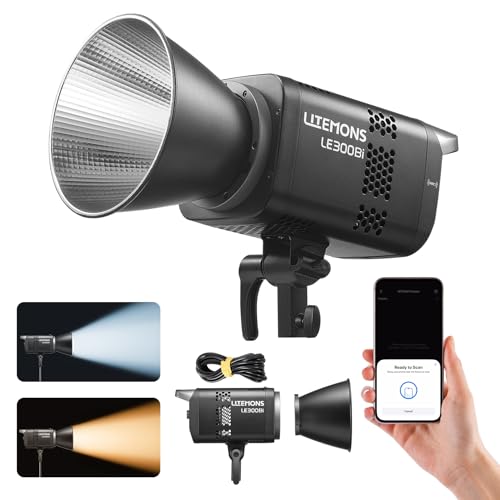
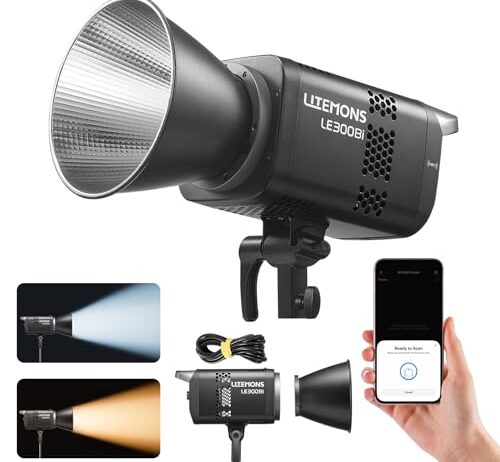
Godox Litemons LE300Bi 320W Bi-Color COB LED Video Light, 58,900Lux@1m, CRI/TLCI 98+, Bowens Mount, App/DMX Control, Quiet Fan, 11 FX Effects for Filmmaking, Live Streaming & Studio

Every LED light sold for video says flicker-free somewhere in the copy. The phrase means the light pulses faster than your eye can track — above roughly 100 Hz. Your camera’s sensor, exposing a frame in 1/100th of a second or less, doesn’t care what your eye can track. It catches whatever slice of the pulse cycle falls inside that exposure window. If the light is off during that slice, you get a dark band across your footage. The fix is a PWM frequency high enough that even a fast shutter captures several complete on-off cycles, and the number you need — above 1,000 Hz, ideally above 3,000 — almost never appears on the box.

Affiliate disclosure: This article contains affiliate links. We may earn a commission if you buy through them, at no extra cost to you.

Everything we recommend
4 picks

How we picked

We did not plug these lights in or shoot footage with them. Judgements come from published specifications, PWM behavior patterns across LED driver designs, and owner reports.

Color accuracy rated, not assumed

CRI and TLCI scores tell you color fidelity. They say nothing about flicker — but a manufacturer that measures them is more likely to have characterized PWM behavior too.

Form factor matched to job

A 320W COB on a Bowens mount and a magnetic tube light solve different problems. We sorted by shooting scenario, not wattage.

Control interface depth

DMX integration matters for multi-light setups where flicker sync becomes critical. App-only or on-body controls limit your options differently.

PWM silence as a signal

None of these four publish a PWM frequency. That absence is the subject of the article, and why it matters more than the numbers they do print.


The Number That Actually Matters Isn’t on the Box

CRI tells you whether a red apple looks red under your light or shifts toward orange. TLCI does the same thing weighted for how cameras read color. Both are useful numbers. Neither one tells you whether the light will strobe on camera.

The number that determines flicker is PWM frequency — how many times per second the LED switches fully on and fully off to simulate a dimmer output. At 100% brightness, most LEDs run continuously and produce no flicker at all. The trouble starts when you dim. The driver shortens each on-pulse while keeping the off-gap, and if that cycle repeats only a few hundred times per second, a camera sensor exposing at 1/200s catches a partial cycle. One horizontal strip of your frame gets the on-phase. Another strip gets darkness. That’s the band.

A PWM frequency above 1,000 Hz means even a 1/200s shutter captures at least five complete cycles per frame. Above 3,000 Hz, you’re safe at virtually any shutter speed a narrative filmmaker would use. Below 1,000, your footage is a coin flip that depends on exact shutter speed, frame rate, and whether your camera’s rolling shutter makes the banding worse by exposing each row of pixels at a slightly different moment.

None of the four lights here publish this number. That’s not unusual — it’s the norm. The industry prints CRI because CRI sells. PWM frequency would sell too, but only to the fraction of buyers who’ve already been burned by banding and know what to look for.

Why CRI Doesn’t Predict Flicker

It’s tempting to assume a light with CRI 98+ is camera-ready in every respect. The logic feels sound: a manufacturer that invested in high color accuracy probably also engineered clean dimming. Sometimes that’s true. Sometimes it isn’t.

CRI measures spectral output — how completely the light covers the visible wavelengths compared to a reference illuminant. TLCI does the same measurement weighted for how a camera sensor responds rather than a human eye. Both are static tests performed at full output. They don’t involve dimming, they don’t measure temporal behavior, and they can’t tell you anything about what happens when the driver starts pulsing.

A light can score CRI 98 and flicker badly at 40% brightness because the driver uses a low PWM frequency to save cost. A light can score CRI 85 and produce zero banding because its driver runs at 25,000 Hz. The two properties are independent — different circuits, different engineering decisions, different line items on the bill of materials.

What CRI does tell you, indirectly, is that the manufacturer cared enough about camera users to measure and publish a spec that matters to them. That’s a weak signal, not a guarantee.

Rolling Shutter Makes It Worse

Most cameras in this price tier use rolling shutters. A global shutter exposes every pixel simultaneously — if the light happens to be off during that instant, the entire frame goes dark, which is obvious and easy to diagnose. A rolling shutter exposes each row of pixels sequentially, top to bottom, taking perhaps 1/30th of a second to scan the full sensor even when the shutter speed is 1/200s.

That scanning means different rows see different phases of the PWM cycle. One horizontal band gets peak brightness. The next gets the gap between pulses. The result is the characteristic horizontal banding that moves slowly through your footage — it doesn’t flash, it scrolls, because the phase relationship between the scan rate and the PWM frequency drifts frame to frame.

Some cameras offer a flicker-reduction mode that tries to synchronize shutter timing with detected light pulsing. When it works, it eliminates banding entirely. When it doesn’t — because the PWM frequency falls outside the range the camera can detect, or because you’re shooting at a shutter speed the mode can’t accommodate — you’re back to hoping.

The practical upshot: if you shoot with a mechanical shutter or a camera that lacks flicker reduction, you need the light itself to solve the problem with a high enough PWM frequency. You can’t fix it downstream.

RGB Modes and White Modes Don’t Always Match

Here’s a detail that catches people off guard. A light can produce perfectly clean video in daylight-white mode at 5600K and then band badly the moment you switch to an RGB color. The reason is that some LED drivers use different PWM circuits — or different frequencies on the same circuit — for the white channel and the RGB channels.

White LEDs in most bi-color and tunable fixtures are dedicated phosphor-coated emitters driven by one circuit. RGB color comes from separate red, green, and blue emitters, sometimes driven by a second circuit with its own frequency characteristics. The white channel might run at 4,000 Hz while the color channels run at 500 Hz, because the manufacturer optimized the white path for video and treated color as ambient decoration where flicker doesn’t matter.

This matters especially for content creators who use colored accent lighting behind a subject or as background wash while key lighting stays white. The key light is clean. The background strobes. You don’t see it until you review footage, because your eye was watching the subject, and the banding only shows on the colored wall behind them.

The LE300Bi is a studio light in the traditional sense — high output through a single large emitter, controlled via DMX or app, mounted on a stand with Bowens-compatible modifiers. That last part matters more than the lux number for video work. A Bowens mount means you can put a softbox, a beauty dish, or a Fresnel lens in front of it without adapters, and the 58,900 lux at one meter gives you enough raw output to push through heavy diffusion and still expose properly at ISO 400.

CRI and TLCI both rated at 98+ put it at the top of this set for color accuracy — skin tones under this light should match what your eye sees with minimal correction in post. The 11 built-in FX modes cover things like fire flicker and lightning simulation, which are niche but useful when you’d otherwise need a separate flicker box. DMX control means it integrates into multi-light setups where you’re controlling everything from a board, and that same integration is where flicker synchronization becomes most critical — if one light in a three-light setup pulses at a different phase, the banding appears on only part of the subject, which is harder to fix than uniform banding across the whole frame.

What You Can Fix With Settings, and What You Can’t

Some camera-side adjustments help. Matching your shutter speed to a multiple of the PWM frequency eliminates banding entirely — if you know the frequency. At 1,000 Hz, a 1/100s shutter captures exactly 10 complete cycles. At 1/125s, you capture 8 complete cycles. Both are clean. But at 1/160s, you capture 6.25 cycles, and that fractional cycle is the band.

The problem is that you rarely know the frequency, so matching is guesswork. You can try different shutter speeds until the banding disappears, but that constrains your exposure and your motion look. A filmmaker who needs 1/48s for the 180-degree shutter rule at 24fps can’t switch to 1/100s without doubling the motion blur reduction and changing the entire feel of the footage.

Frame rate changes help sometimes. Shooting at 50fps instead of 24fps changes which shutter speeds produce clean results, but it doesn’t increase the PWM frequency — it just shifts which fractional-cycle artifacts appear. Switching to a global-shutter camera eliminates banding specifically (the horizontal stripe artifact) but can introduce full-frame flicker instead, which shows up as brightness pumping between frames.

The cleanest fix is always at the source: a light with a PWM frequency high enough that no shutter speed you’d reasonably use produces a fractional cycle.

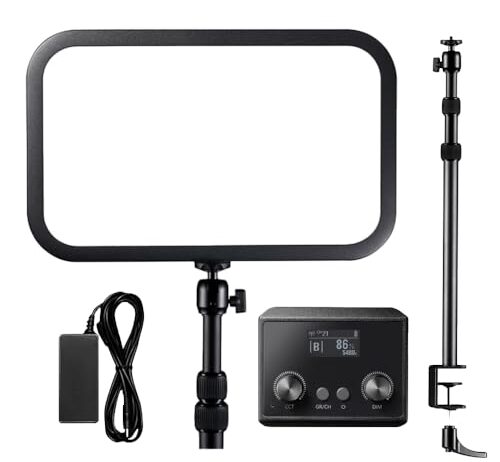
The ES45 is a single-purpose tool: it sits on your desk, points at your face, and lights a webcam or streaming frame. The built-in stand eliminates a clamp or arm. The detachable remote charges when it’s docked to the light, so it’s always ready without a separate cable. These are convenience details, but convenience is most of what separates a light you actually leave set up from one that goes back in the box.

At 2500 lumens with a non-glare descriptor, the output is modest compared to the LE300Bi’s 58,900 lux — but that comparison misses the point. A desk light two feet from your face needs far less output than a studio light eight feet from a subject bounced through a softbox. The color temperature range of 2800K to 6500K covers warm tungsten through cool daylight, which lets you match overhead room lights or window light without a gel. CRI 96+ and TLCI 97+ are close enough to the LE300Bi’s 98+ that the difference is invisible without side-by-side measurement on a color chart.

Portability Costs You Control

The LOUERN stick and the Nanoleaf panels sit at opposite ends of a trade-off that runs through all lighting: the more portable and self-contained a light is, the less information you get about how it behaves.

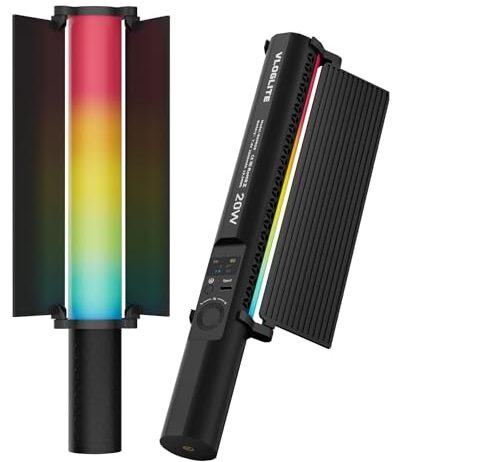
A handheld tube light with a magnetic mount is genuinely useful for run-and-gun video. You stick it to a car door, a metal shelf, the side of a filing cabinet. You move it between setups in seconds. The 1800K to 9000K range on the LOUERN is the widest here by a large margin — warm enough for candlelight simulation, cool enough for moonlight. CRI 95+ with an included diffuser and barndoor suggests the manufacturer was thinking about camera users, not just ambient decoration.

But that form factor leaves no room for DMX, and the control interface isn’t detailed — which usually means on-body buttons and possibly an app. When a light doesn’t offer external control, you can’t synchronize its PWM phase with other lights in a multi-source setup, and you can’t remotely adjust it mid-shot.

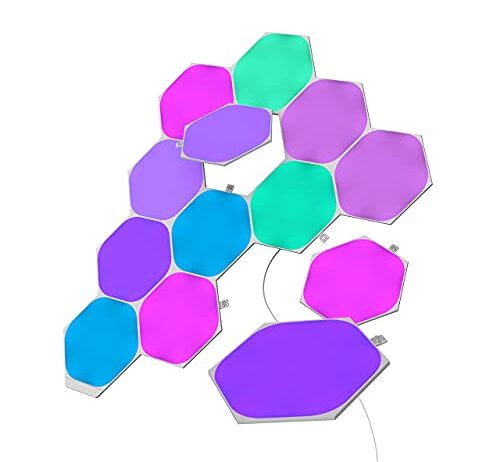
The Nanoleaf hexagons occupy a different category entirely. They’re wall-mounted ambient panels designed for gaming rooms and streaming backgrounds — RGB decorative light, not camera key lighting. The absence of any CRI rating and the RGB-only color system (no bi-color white tuning) confirm they’re engineered for how a room looks to the person sitting in it, not for how it reads on a sensor. Using them as set lighting behind a streaming subject is common, and it works — until you shoot at a shutter speed that catches their PWM cycle, and then the background strobes while everything else stays clean.

The One Test You Can Do Yourself

If you already own an LED light and want to know whether it’ll band on camera, there’s a simple check. Set your camera to its fastest shutter speed — 1/4000s or 1/8000s. Point it at the light (not directly into the emitter; at a wall the light is hitting). Dim the light to about 50%. Take a burst of photos.

If every frame is the same brightness, the PWM frequency is high enough that even your fastest shutter is capturing multiple complete cycles. If the frames alternate between bright and dark — or if you see horizontal bands in the image — the frequency is low enough to cause problems at working shutter speeds too, just less visibly.

For video, shoot a few seconds at each shutter speed you’d normally use. Banding that’s invisible at 1/50s might appear at 1/100s and become severe at 1/200s. The transition isn’t gradual — it tends to snap from clean to banded at a specific speed, which is the speed where your exposure time first fails to capture a whole number of PWM cycles.

This test costs nothing but five minutes, and it tells you more about your specific unit than any spec could — because PWM behavior can vary between production runs of the same model, and between dimming levels on the same unit.

FAQ

Why do my LED lights flicker on camera but look fine in person?

Your eye blends any light pulsing faster than about 100 Hz into steady brightness. Your camera sensor exposes each frame in a fraction of a second — sometimes as fast as 1/200s — and can catch the gap between pulses. That gap becomes a dark band across your footage. The light hasn’t changed; the sensor is just faster than your eye.

What PWM frequency eliminates banding in video?

Above 1,000 Hz removes banding at most common video shutter speeds. Above 3,000 Hz is safe for virtually all cinema and photography shutter speeds, including 1/200s and faster. Below 1,000 Hz, you’ll likely see banding at some shutter speed, even if you can find one that works.

Does a high CRI rating mean less flicker?

No. CRI measures how accurately a light reproduces colors — it’s a spectral test, not a temporal one. A light can have CRI 98 and flicker badly, or CRI 80 and produce zero banding. The two properties come from different circuits and are engineered independently.

Can I fix LED banding by changing my shutter speed?

Sometimes. If you set your shutter speed to a value that captures a whole number of PWM cycles, the exposure averages out and banding disappears. The problem is that you rarely know the PWM frequency, so you’re adjusting blind, and the shutter speed that eliminates banding may not be the one your scene or motion look requires.

Do RGB color modes flicker more than white modes on the same light?

They can. Some LED drivers use different PWM circuits or frequencies for the white emitters and the RGB emitters. A light that’s clean in white mode at 5600K might band noticeably in blue or red mode because the color channel runs at a lower frequency. There’s no way to predict this without testing each mode individually.