We research every product we recommend. We may earn a commission from the links on this page.
Electronics › Chargers & Adapters

Your USB-C Charger’s Wattage Number Is Lying to You

We compare published specifications and marketplace data. We do not test these products.

GaN Chargers Run Hotter Because the Package Is Smaller
Photo by Jordan Rushton on Pexels

A 140W USB-C charger plugged into two devices doesn’t give each one 70W. It negotiates — and the split depends on which port you used, what you plugged in first, and whether your cable can even carry the load. GaN technology shrinks the brick but doesn’t change the math: total output is a budget, not a promise per port. Here’s how that budget actually works, what the wattage number on the box leaves out, and which charger shape fits which charging problem.

Affiliate disclosure: This article contains affiliate links. We may earn a commission if you buy through them, at no extra cost to you.

Everything we recommend
4 picks

Every switching power supply — the kind inside every phone charger, laptop brick, and USB-C adapter sold today — converts AC from your wall into DC your device can use. It does this by rectifying mains power to high-voltage DC, then chopping it at high frequency through a transformer to step it down. Silicon transistors in older designs switch at 50 to 300 kHz. GaN transistors switch above 1 MHz.

That speed difference matters because faster switching means smaller magnetic components. The transformer and inductors inside a charger shrink when the switching frequency goes up, which is why a 70W GaN charger fits in your palm while a 90W silicon adapter needs a brick the size of a deck of cards plus a separate cable. But smaller components packed tighter means the 3 to 5 watts of heat every charger wastes have fewer square centimeters to escape through.

How we picked

We did not test these chargers. Judgement is based on published specifications, chipset capabilities, and marketplace review data.

Total budget, not per-port claims

We ranked chargers by their actual shared wattage across all active ports, not the number printed on the housing.

Cable limits, not brick limits

A charger’s output means nothing if the cable can’t carry it. We checked rated capacity for included cables.

Thermal ratings, not size alone

GaN reduces charger volume but doesn’t eliminate heat. We looked for passive cooling headroom in the published thermal envelope.

Connector fit, not voltage range

Fixed-voltage barrel adapters must match both the voltage and amperage your device expects. We verified model compatibility lists.

The wattage on the box is a budget, not a per-port promise

Plug one device into a 70W charger and it can pull up to 70W. Plug in a second device and the charger renegotiates — it sends a signal over the CC wire in each USB-C cable telling both devices to reduce their draw so the total stays under 70W. This happens silently. Your laptop doesn’t tell you it just dropped from 70W to 45W. Your phone doesn’t announce it’s now getting 20W instead of 25W.

The renegotiation is automatic and mandatory. USB Power Delivery uses a dedicated Configuration Channel line in the cable to talk to the charger before power flows. The charger and device agree on a voltage and current — 5V at 3A, 9V at 3A, 15V at 3A, 20V at 5A — and power delivery begins only after that handshake completes. Add a second device and the whole conversation restarts on every active port.

This is where port count and total wattage collide. A three-port charger rated at 70W with all three ports occupied might deliver 30W, 25W, and 15W — or some other split the charger’s firmware decides. The 70W number was never wrong. It just never meant what most people assume.

Your cable might be the bottleneck you never check

USB-C cables rated for more than 60W need an embedded e-marker chip — a tiny IC inside the connector that tells the charger how much current the cable can handle. Without it, the charger defaults to 60W maximum regardless of what the charger itself can produce. A 140W charger plugged into a laptop with a cheap 3A cable tops out at 60W. No error message. No warning. Just slow charging.

The cable that shipped with your phone is almost certainly a 3A cable. It’s fine for 60W. Anything above that needs a 5A cable with the e-marker, and those aren’t universal — you have to buy one that’s explicitly rated for 100W or 240W. The charger that came with the cable in the box might handle 140W. The cable itself might not.

Heat isn’t a defect — but size decides where it goes

GaN chargers run at roughly 95% conversion efficiency. Silicon designs sit around 85 to 90%. That means a 70W GaN charger wastes about 3.5W as heat, while a 70W silicon charger wastes 7 to 10W. GaN produces less total heat.

But feel the outside of a compact GaN brick after an hour of charging a laptop, and it’s warm — sometimes uncomfortably warm. That’s not a contradiction. The heat has to go somewhere, and it escapes through the plastic shell via conduction and then into the air via convection. A smaller shell has less surface area. Less surface area means a higher surface temperature for the same amount of waste heat.

A charger with a 50 cm² exterior surface at 60°C dissipates heat at a certain rate. Double the surface area to 100 cm² — by making the charger physically bigger — and the same waste heat spreads across more material, lowering the surface temperature. Foldable prongs make a charger more pocketable but remove metal mass that would otherwise conduct heat away from the circuit board. Every millimeter of size reduction is a thermal trade-off.

This is normal. A warm GaN charger is doing exactly what physics says it should. A hot silicon charger of the same wattage would be wasting more energy and still be warm — it would just be bigger, so the warmth would spread out and feel less alarming.

PD 3.0 versus PD 3.1: the 100W wall

USB Power Delivery 3.0 caps at 100W. It can negotiate up to 20V at 5A, and that’s the ceiling. PD 3.1 extends the spec to 240W by allowing voltages up to 48V, which is how a USB-C charger can feed a 16-inch MacBook Pro at full speed — something no PD 3.0 charger can do, even if the charger’s internal power supply could produce the wattage.

This matters if your laptop draws more than 100W. A 140W charger with PD 3.0 would be capped at 100W over USB-C regardless. A 140W charger with PD 3.1 can actually deliver the full 140W. The protocol version is the gatekeeper, not the power supply.

For phones and tablets, none of this matters. No phone draws more than 30W from USB-C. PD 3.0 handles every phone on the market. The version only becomes relevant when you’re charging laptops — specifically large-screen, high-performance laptops that pull 100W or more under load.

Barrel connectors: a different problem entirely

USB-C negotiates. A barrel connector does not. A barrel-connector laptop adapter outputs a fixed voltage — 20V, say — and the laptop either accepts it or doesn’t. There’s no handshake, no fallback profile, no graceful reduction. If the voltage is wrong, the laptop’s internal regulation either compensates (slowly, with extra heat) or the laptop refuses to charge at all.

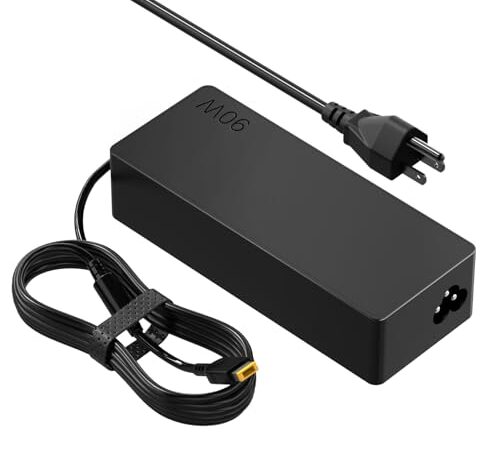
Replacing a lost or broken barrel-connector charger means matching the voltage and amperage exactly. A 90W adapter at 20V and 4.5A fits a specific list of Lenovo models because those models expect 20V input through a specific barrel size. A 65W adapter at the same voltage but 3.25A will physically connect but may not keep the laptop charged under load — the machine draws more than the charger supplies, and the battery drains even while plugged in.

This is why USB-C PD exists. Negotiation eliminates the matching problem. But if your laptop has a barrel connector, you’re locked into the old system, and the only safe replacement is one that matches the original specs exactly.

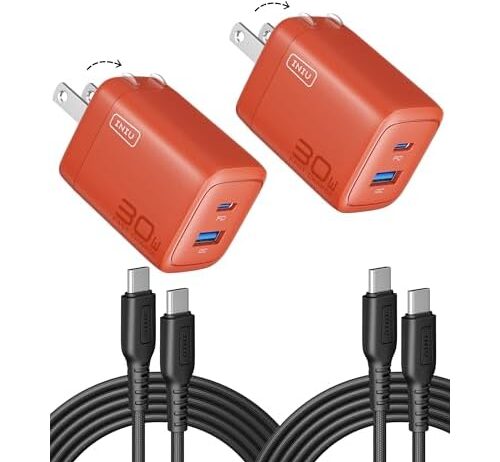
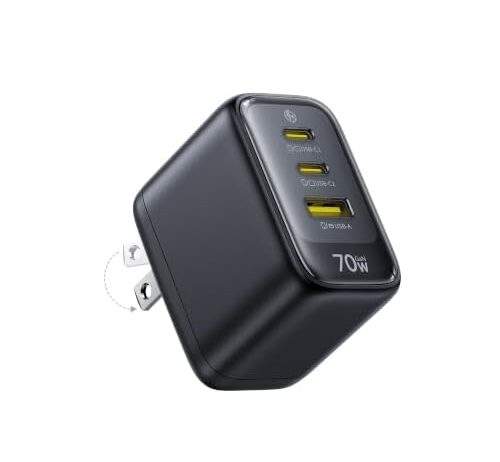
The Baseus Enerfill puts 70W and three USB-C ports into a wall brick with a foldable plug. That’s the right wattage for a 13-inch laptop charging overnight alongside a phone and a set of wireless earbuds — none of those devices needs 70W alone, and the three-way split still leaves enough per port for each to charge at a reasonable rate.

The foldable prongs flatten the profile for a bag or drawer, but they also remove the metal-to-wall contact area that conducts heat out of the charger body. At 70W, the waste heat is roughly 3.5 watts — manageable for a compact housing, but expect the brick to feel noticeably warm during sustained laptop charging. That’s the surface area trade-off at work: pocketable size, higher surface temperature, same total heat.

All three ports are USB-C, which means no USB-A fallback for older cables. If your devices are all USB-C — and most things sold in the last three years are — that’s not a limitation. If you still carry a USB-A cable for something, this charger won’t accommodate it.

When you need AC outlets, not just USB ports

Some devices don’t charge over USB. A CPAP machine, an electric razor, a camera with a proprietary wall charger — these need an AC outlet, and no number of USB-C ports replaces one. A travel adapter that includes AC outlets alongside USB ports solves a different problem than a pure USB charger, and it solves it at a different size and price.

The trade-off is bulk. A charger with AC outlets has to house the relay or pass-through hardware for mains power in addition to the USB conversion circuitry. It’s bigger, heavier, and more expensive per watt of USB output. But if you’re in a hotel room with one available outlet and three devices that need USB plus one that needs AC, a single adapter that handles both is the difference between charging everything overnight and choosing what gets power.

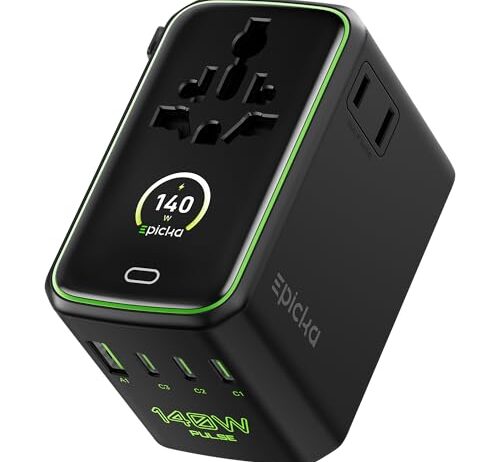
The Epicka Pulse Duo is a travel adapter first and a USB charger second. Two AC outlets, two USB-C ports, two USB-A ports, and interchangeable plug heads for different regions. At 140W with PD 3.1, it can deliver enough power over USB-C to charge a 16-inch MacBook Pro at full rated speed — something a PD 3.0 charger physically cannot do, because the protocol caps at 100W regardless of the hardware behind it.

The larger body isn’t a design failure — it’s a thermal advantage. More internal volume means more room for the power conversion circuitry and more exterior surface area to shed heat. At 140W, the charger wastes roughly 7 watts as heat even at GaN-level efficiency. Spread across a travel-adapter-sized housing, that heat is less concentrated than in a pocket-sized brick trying to deliver the same wattage.

The six-port layout means heavy power splitting when everything is plugged in simultaneously. 140W divided across six active ports leaves each one well below its solo maximum. The AC outlets draw from mains directly and don’t count against the USB power budget, so the real split is 140W across the four USB ports — still enough for a laptop and two phones, but not enough for two laptops at full speed.

Matching the right charger to the right problem

If you’re replacing a dead laptop charger with a barrel connector, you need the exact voltage and amperage match. No GaN charger fixes this unless your laptop also has USB-C charging. If it doesn’t, you’re buying a barrel-connector replacement at the original specs.

If you’re charging phones and tablets overnight and want a clean nightstand, a compact multi-port GaN brick does the job — 30W to 70W is more than enough for any phone, and the size difference between a GaN adapter and a silicon one at the same wattage is real and visible.

If you travel internationally with a mix of USB and non-USB devices, you need AC outlets, not just USB ports. That means a travel adapter, which means more size, more weight, and more cost — but also more flexibility per outlet.

The wattage number on any of these chargers is real. It’s just not the whole story. The protocol version determines whether that wattage can reach your device. The cable determines whether it can carry the load. The port count determines how the budget splits. And the form factor determines where the heat goes. Pick for the constraint that actually limits you, not for the biggest number on the box.

FAQ

Do GaN chargers get hotter than regular chargers?

They feel warmer because the housing is smaller, but they produce less total heat. A 70W GaN charger wastes about 3.5 watts as heat, while a silicon charger at the same wattage wastes 7 to 10 watts. The higher surface temperature is a consequence of less surface area, not more waste energy.

Can I use any USB-C cable with a high-wattage charger?

Only up to 60W. Above that, the cable needs an embedded e-marker chip that tells the charger how much current it can handle. Without it, the charger defaults to 60W regardless of its own capacity. Cables rated for 100W or 240W have this chip; most phone-bundled cables do not.

Will a 140W charger damage my phone that only needs 20W?

No. USB Power Delivery negotiates before power flows. Your phone tells the charger it wants 9V at 2A, and the charger delivers exactly that — 18W. The 140W rating is a ceiling the charger can provide, not a voltage it forces onto every device.

What happens if I plug two laptops into a multi-port charger?

The charger renegotiates and splits total wattage across all active ports. Two laptops on a 70W charger might each get 35W — enough to charge slowly when idle, but potentially not enough to keep up with power draw under heavy use. One laptop may discharge while the other charges.

How do I find the right replacement charger for a barrel-connector laptop?

Check the original charger’s label for voltage (V) and amperage (A). The replacement must match the voltage exactly — a 19.5V laptop needs a 19.5V charger, not a 20V one. Amperage can be equal or higher than the original without risk, since the laptop draws only what it needs. The barrel connector’s outer and inner diameter must also match physically.