We research every product we recommend. We may earn a commission from the links on this page.
Electronics › Keyboards

Hot-Swap Sockets Wear Out. Magnetic Switches Don’t Care.

We compare published specifications and marketplace data. We do not test these products.

Hot-Swappable Keyboard Sockets Wear Out With Each Switch Pull
Photo by Francesco Ungaro on Pexels

Every time you pull a mechanical switch out of a hot-swap socket and push a new one in, the spring contacts inside that socket flex a little wider and don’t quite spring back. Do it twenty times, fifty times, a hundred — the socket gets looser, contact resistance climbs, and eventually a key starts chattering or dropping inputs entirely. The switch works fine in a different socket. The problem is the hole it came out of. Here’s what’s actually happening inside those sockets, which keyboards handle it differently, and when the whole wear mechanism stops mattering.

Affiliate disclosure: This article contains affiliate links. We may earn a commission if you buy through them, at no extra cost to you.

Everything we recommend
4 picks

How we picked

We do not swap switches in these keyboards. Judgments draw from socket durability data, published Hall-effect specifications, and marketplace failure reports.

Contact mechanism, not feature list

Hall-effect eliminates insertion wear entirely. Hot-swap sockets with Kailh or Gateron tolerances differ in rated cycle count and measured retention force.

Layout cost versus swap frequency

Full-size and 96% boards carry more sockets. The value of hot-swap drops when you settle on one switch type after initial selection.

Build quality at entry price

Gasket mount and wireless tri-mode connectivity affect long-term satisfaction independent of socket durability. Bundles shift the effective per-component cost.

Replacement availability, not promises

Individual socket replacement requires desoldering skill and matching part numbers. Magnetic switches sidestep the repair question by removing mechanical contact degradation.

What’s Inside a Hot-Swap Socket

A hot-swap socket is a small metal housing soldered to the PCB with two spring-loaded contacts inside. Each contact is a thin leaf of phosphor bronze or beryllium copper — metals chosen because they conduct electricity well and hold a spring shape under repeated stress. The contacts are sized to grip a switch pin about 1.3 to 1.4 mm in diameter with an interference fit: the aperture is slightly smaller than the pin, so the pin forces the contacts apart on insertion and friction holds the electrical connection.

That interference fit is the entire mechanism. There’s no latch, no screw, no secondary retention. The connection exists because the spring pushes hard enough against the pin to break through the thin oxide layer that forms on any exposed metal surface. Below a certain contact force, the oxide stays intact, resistance spikes, and the signal becomes intermittent.

Every insertion widens the aperture slightly. The spring metal work-hardens — repeated deflection rearranges the grain structure, making the material stiffer but less elastic. It’s the same reason a paperclip snaps if you bend it back and forth enough times. The contacts don’t snap, but they stop returning to their original position. After enough cycles, the gap is wide enough that the pin sits loose, contact force drops below the oxide-rupture threshold, and the key starts misbehaving.

Why Socket Wear Feels Random

Some people report socket failure after twenty swaps. Others go past a hundred with no issues. That spread isn’t because some sockets are built better — it’s because the variables that accelerate wear are invisible to the person doing the swapping.

Pin diameter matters. A switch with pins at the fat end of the 1.3–1.4 mm range deflects the contacts farther on every insertion than one at the thin end. Even 0.05 mm of additional aperture enlargement can reduce contact force by 30 to 40 percent. If you’re cycling through switches from different manufacturers with slightly different pin tolerances, you’re accelerating wear faster than someone who swaps between two batches of the same switch.

Pin plating matters too. Most switch pins are brass or nickel with a thin gold flash on top. That gold layer reduces friction during insertion and resists oxidation at the contact point. It also wears away. Once the base metal is exposed, oxidation accelerates, and the contact resistance problem arrives earlier than the mechanical looseness would predict.

Angle of insertion matters. A pin that goes in crooked bends the contact leaf sideways instead of deflecting it evenly. One bad insertion can do more damage than ten clean ones. There’s no way to know this happened until the key starts acting up weeks later.

Chatter, Wobble, and Telling Them Apart

When a key starts double-firing or dropping inputs, two things can cause it: the switch’s internal leaf contacts bouncing (switch chatter) or the socket’s spring contacts losing grip (socket failure). To the keyboard’s controller, these are electrically identical — both produce intermittent connection on the same circuit. The controller doesn’t know whether the break is happening inside the switch or underneath it.

The diagnostic is simple but annoying. Pull the suspect switch and put it in a socket you know works. If the problem follows the switch, the switch is bad. If the original socket still misbehaves with a known-good switch, the socket is worn. Most people replace the switch first, because switches are cheap and easy to swap. When the problem persists, that’s when the socket diagnosis lands — and by then you’ve already bought replacement switches you didn’t need.

Physical wobble is the other tell. A switch that rocks in its socket when you press the keycap sideways has lost the interference fit. It may still work electrically — for now. But every keystroke lets the pin shift microscopically against the contact, accelerating both oxide formation and further mechanical wear. Wobble is the early warning. Chatter is what comes after.

Gasket Mounts Hide the Feel, Not the Failure

A gasket-mount keyboard suspends the plate-and-PCB assembly on strips of compressible material — silicone, poron foam, EPDM — between the plate edges and the case walls. Keystrokes feel softer and more even because the impact disperses through the gasket instead of transmitting directly into a rigid case. It’s a genuine improvement in typing feel.

It also masks early socket wear. A switch that’s developed slight wobble in a tray-mount keyboard — where the plate is screwed directly to the case — transmits that wobble as a detectable change in how the key feels under your finger. In a gasket mount, the compressible layer absorbs the same wobble. The key still feels normal. The socket is still degrading. You just don’t notice until the electrical failure arrives, which means you miss the window where you might have stopped swapping that particular key.

This isn’t a reason to avoid gasket mounts. It’s a reason to check switch fit occasionally if you swap often, rather than relying on feel alone.

The ATK Edge 63 uses TTC Snake magnetic switches, and this is where the entire wear conversation stops applying. A Hall-effect switch doesn’t register a keypress through metal-on-metal contact. A magnet rides on the switch stem, and a sensor on the PCB measures the magnetic field strength as the stem moves. The pin-socket interface still exists mechanically — the switch sits in a housing — but the electrical detection happens through the magnetic field, not through contact force. If the housing loosens slightly over time, the sensor still reads the magnet’s position accurately. The failure mode that kills traditional hot-swap sockets — oxide buildup on degraded contacts — doesn’t exist here.

The actuation range is adjustable from 0.001 to 3.3 mm per key, which means you can set different keys to different depths without swapping anything physically. The switch experimentation that wears out traditional sockets — pulling switches to try different actuation feels — gets replaced by software adjustment. The 8000 Hz polling rate matters here too, but not for the reason marketing suggests: high polling doesn’t rescue a worn socket (the missed scans from intermittent contact happen below the polling layer), but paired with a sensor that never loses contact, it does mean the board captures every actuation change you set, down to fractions of a millimeter.

The CNC aluminum case and 63-key compact layout put this at a different price point — $231.98 against boards in the $70–$110 range. You’re paying for the sensor technology and the build material, not for a larger key count. If you’re the kind of person who swaps switches seasonally to try new feels, this is the board where that habit has zero mechanical cost.

More Keys, More Sockets, More Exposure

A full-size 104-key board has 104 sockets. A 60% board has 63. If you swap every switch on the board each time you experiment, the full-size layout puts nearly twice as many sockets through a wear cycle. That sounds obvious, but the implication isn’t: most people don’t swap every key. They swap modifiers, the spacebar, maybe the alphas — and leave function keys and the numpad alone. On a compact board, there’s nowhere to hide. Every key is a key you use constantly, and every socket gets the same cycle count.

The practical difference is that full-size boards tend to develop socket problems in clusters — the keys you actually swapped — while compact boards either wear evenly or not at all. If you’re someone who swaps the whole set once and then leaves it, the layout size barely matters. If you’re someone who tries three different switches on WASD every month, those four sockets on any layout are aging faster than the rest.

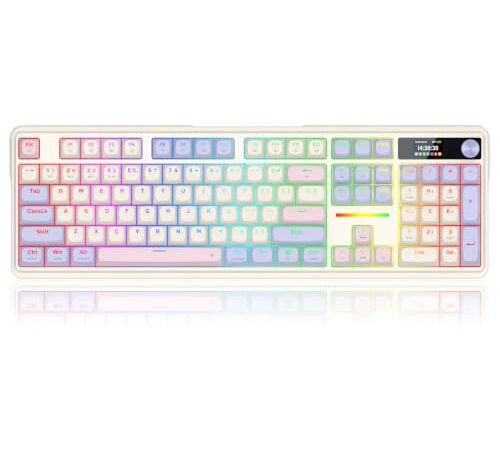
The Redragon K762 PRO gives you the full 104-key layout with gasket mounting and wireless connectivity. The gasket construction means the typing feel will be forgiving and even across the board, which is what most people want from a daily driver. The screen and knob add macro and media control without extra software layers.

Where this board fits the socket-wear question is in how you plan to use it. At $76.99, it’s priced for someone who wants to find the right switch — try two or three types, settle on one, and leave it. It’s not priced or built for someone who rotates switches monthly as a hobby. The gasket mount will smooth out the feel of whatever you install, but as covered above, it’ll also mask early signs of socket looseness if you swap aggressively. Use it as a destination board: pick your switch, install it once, and enjoy the gasket flex and wireless freedom without worrying about cycle counts.

When the Bundle Changes the Calculation

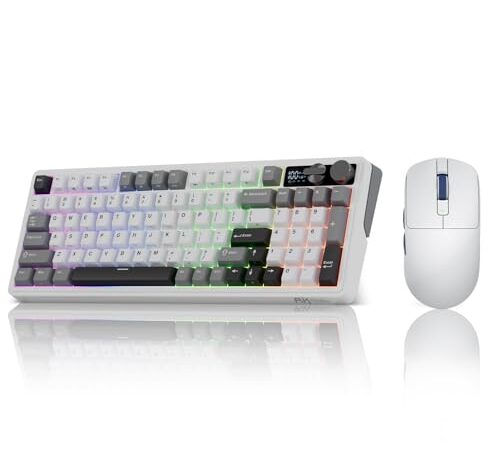
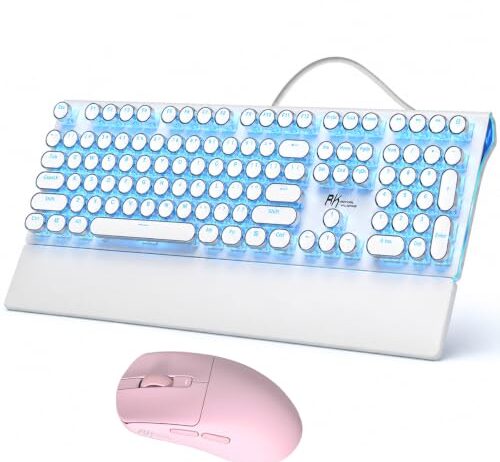
Two of these products ship with a gaming mouse included — the RK ROYAL KLUDGE S108 bundles the RK M30 wireless mouse at $73.78 for the pair, and the RK ROYAL KLUDGE M100 bundles the same M30 mouse (PAW3311 sensor, 24000 DPI, 43g) at $106.78 with a gasket-mount 96% keyboard and tri-mode connectivity.

The bundle doesn’t change anything about socket durability directly. But it changes who buys the board and why. A bundle buyer is typically setting up a full desk — first gaming rig, dorm room, new workspace — and is less likely to be a switch enthusiast who cycles through a collection. That usage pattern is actually ideal for hot-swap longevity: install the stock switches, use them until they wear out (which takes years of normal typing), and never stress the sockets at all.

The M100 at $106.78 adds gasket mounting and a 96% layout — you keep the number pad but lose the function-key row’s spread, making it more compact without sacrificing data entry. The tri-mode connectivity means wired, Bluetooth, and 2.4 GHz wireless, so the same board moves between a desktop and a laptop without re-pairing. For someone who wants one keyboard that works everywhere and doesn’t plan to swap switches regularly, the socket question is academic.

Can You Fix a Worn Socket?

Technically, yes. A worn hot-swap socket can be desoldered from the PCB and replaced with a new one. In practice, this requires a soldering iron, flux, desoldering braid or a pump, and a steady hand — exactly the tools and skills that hot-swap was designed to let you avoid. If you bought a hot-swap board because you don’t want to solder, you’re not going to solder to fix it.

The interim fix that actually works is tweaking the socket contacts with a thin tool — a SIM-card ejector pin or a fine dental pick — to bend the spring leaves slightly inward, restoring some of the interference fit. This buys time. It doesn’t fix the underlying work hardening, and the contacts will relax again faster than they did originally because the metal’s elastic memory is already compromised. You might get another twenty to thirty cycles before the problem returns.

The permanent fix for boards you plan to keep long-term is to stop swapping the problem keys. Install the switch you want, leave it, and let the remaining contact force do its job undisturbed. A socket that’s marginal with frequent swapping can last years with a switch left in place, because the static contact force is higher than the dynamic force during insertion — the pin isn’t deflecting the leaf repeatedly, just sitting against it.

The Decision

If you swap switches as a hobby — new linears this month, tactiles next month, a set of silent switches when the baby arrives — you need a board where that habit doesn’t degrade the hardware. The ATK Edge 63 is the only one here where repeated changes carry zero mechanical penalty, because the actuation detection doesn’t depend on pin-socket contact at all. You pay more for it. You get a board that doesn’t care how many times you change your mind.

If you want to find your switch and settle in, the Redragon K762 PRO and the RK M100 both give you gasket-mounted platforms at accessible prices. Install your preferred switch once, enjoy the typing feel, and the sockets will outlast the keycaps. The K762 PRO is the simpler play at $76.99 if you only need the keyboard. The M100 bundle at $106.78 makes sense if you need a mouse too and want the 96% layout’s number pad without a full-size footprint.

The RK S108 typewriter bundle is an aesthetic choice — the retro keycap profile and blue backlight are the point, and at $73.78 with a mouse included, it’s the lowest entry cost here. It’s for a desk that looks a certain way, not for someone who plans to open the case and experiment with internals.

FAQ

How many times can I swap switches before the sockets wear out?

There’s no single number — it depends on pin diameter tolerance, insertion angle, and pin plating condition. Reported failures range from around 20 swaps to over 100 with no issues. The variables that matter most are whether you use switches with consistent pin sizes and whether you insert them straight every time. Crooked insertion does disproportionate damage.

Do magnetic switches last longer than regular hot-swap switches?

They sidestep the problem entirely. Magnetic Hall-effect switches detect key position through a magnetic field, not through the metal-on-metal contact that degrades in traditional hot-swap sockets. The socket housing still holds the switch physically, but the electrical detection doesn’t depend on contact force, so loosening doesn’t cause signal problems.

Can I replace a worn-out hot-swap socket without desoldering the whole board?

You can replace individual sockets, but each one requires desoldering the old socket and soldering a new one — the same skill set hot-swap was designed to avoid. A temporary fix is bending the internal spring contacts inward with a fine tool to restore grip, but this buys limited time before the work-hardened metal relaxes again.

Why do some keys feel wobbly after I swapped switches a few times?

The spring contacts inside the socket have widened past the point of tight interference fit with the switch pin. The pin no longer sits snugly, so the switch can rock in the housing. This wobble is a precursor to electrical problems — the pin shifting under keypress force can break and remake contact intermittently.

Does a gasket-mount keyboard hide socket wear?

Yes, but unintentionally. The compressible gasket material absorbs slight switch wobble that you’d feel immediately in a rigid tray-mount board. The socket is still degrading — you just can’t detect it through feel until the electrical failure stage. Check switch fit manually if you swap often on a gasket board.

Will using the same switches permanently instead of swapping prevent socket wear?

Effectively, yes. A switch left in place maintains static contact force without the repeated deflection that causes work hardening. Sockets with a switch installed continuously can last the lifetime of the keyboard. The wear mechanism is driven by insertion and removal cycles, not by keypresses.