We research every product we recommend. We may earn a commission from the links on this page.
Tools & Home Improvement › Ceiling Fans

The Hum Between Speeds — What DC Ceiling Fans Do at Half Power

We compare published specifications and marketplace data. We do not test these products.

DC Motor Ceiling Fans Hum When the Controller Chops Voltage
Photo by Vladimir Srajber on Pexels

A brushless DC ceiling fan on speed three makes a sound that speed five doesn’t. Not louder — different. A tonal hum, steady, sitting right at the edge of noticeable. It isn’t the bearings. It isn’t the blades cutting air. It’s the controller switching current on and off thousands of times per second, and the motor’s own metal vibrating in response. The hum is loudest in the middle of the speed range and nearly gone at the top and bottom, which means the fan you pick — and how many speed steps it gives you — determines whether you can land on a comfortable setting or get stuck on the buzzy one.

Affiliate disclosure: This article contains affiliate links. We may earn a commission if you buy through them, at no extra cost to you.

Everything we recommend
4 picks

How we picked

We did not install these fans. Judgements come from published motor specs, blade geometry, control granularity, and owner reports.

Speed increments, not just top speed

More steps between off and full let you skip the duty cycles where a motor’s windings resonate. Six speeds matter more than peak CFM here.

Blade sweep relative to room size

A larger fan moves the same air at lower RPM — fewer passes through the mid-range PWM zone where hum peaks.

Motor type stated, not assumed

DC motor confirmation means PWM control is present. Fans without a stated motor type can’t be evaluated for switching behavior.

Outdoor rating by certification, not label

Wet-rated housings use denser, sealed enclosures that dampen vibration differently than vented indoor designs.


What the Motor Is Actually Doing at Medium Speed

A brushless DC motor doesn’t slow down by getting less voltage the way an old AC fan does. It gets full voltage, chopped into rapid pulses. The controller switches current to the motor windings on and off at frequencies typically between 15 and 25 kHz — above what you can hear directly. But the switching does something physical: it makes the metal laminations inside the motor flex. Every on-off cycle exerts a magnetic force that pushes the stator’s steel plates apart by a microscopic amount, then releases. Do that 20,000 times a second and the metal vibrates at harmonics well within hearing range.

This is magnetostriction. It happens in every brushless motor, every transformer, every electromagnetic device that switches current rapidly. The question isn’t whether it happens. It’s how loud it gets.

At full speed — 100% duty cycle — the controller stops switching. Current flows continuously. No on-off transitions, no vibration source, no hum. At very low speed the current is so small that the forces on the laminations are weak. The hum is there, technically, but below the threshold you’d notice in a room with any ambient sound at all.

The middle is the problem. Somewhere around 30 to 60 percent duty cycle, the switching pattern hits the mechanical resonant frequency of the motor housing. The housing amplifies the vibration the way a guitar body amplifies a string. A lighter or less rigid housing makes it worse. A heavier cast-metal enclosure damps it. That’s physics, not quality control — though quality control determines how tightly the laminations are stacked and whether the housing rattles against the canopy.

Why More Speed Settings Change the Problem

A three-speed fan gives you three duty cycles: roughly 33%, 66%, and 100%. If the motor’s resonant sweet spot sits at 45% — which you’d feel as a hum on speed one or two — you can’t get there. You’re stuck on either side of it, choosing between too slow and too fast.

A six-speed fan cuts the increments roughly in half. Instead of jumping from 33% to 66%, you step through approximately 17%, 33%, 50%, 66%, 83%, and 100%. That means you can land on 17% or 33% and skip right past whatever narrow band makes your particular motor sing. Every motor is slightly different — manufacturing tolerances shift the resonant frequency — so finer increments aren’t a guarantee of silence, but they are a guarantee of more options to dodge the noise.

This is the real reason six speeds matters on a DC fan. It’s not about granular comfort — though that helps — it’s about giving you enough steps to find the quiet ones.

Blade Size Determines How Often You Need Mid-Range

A 56-inch fan spinning at 100 RPM moves roughly the same volume of air as a 28-inch fan at 400 RPM. The larger fan does the same job at a fraction of the rotational speed, which means the controller can sit at a lower duty cycle — or at full speed on a lower setting — rather than parking in the mid-range where hum peaks.

This is the strongest argument for oversizing a ceiling fan relative to the room, at least for noise. A fan that’s slightly too big for the space runs on speed two or three out of six and delivers comfortable airflow. A fan that’s slightly too small needs speed four or five, which pushes right into the duty-cycle zone where the switching pattern and the motor housing conspire to make noise.

The trade-off is clearance. A 56-inch fan in a 10-by-10 bedroom overwhelms the space visually and may not clear furniture if the ceiling is under nine feet. A 42-inch fan in the same room runs harder for the same breeze. Neither is wrong — but one hums more.

Sealed Housings Change the Resonance

Wet-rated ceiling fans — rated to UL 1598 for direct rain exposure — require sealed motor housings. The seal keeps moisture out, but it also adds mass and rigidity to the enclosure. A denser housing has a higher resonant frequency and damps low-frequency vibration more effectively than a vented indoor design where air gaps let the housing flex.

This doesn’t mean every outdoor fan is quieter. It means the housing itself contributes less amplification to whatever magnetostriction the motor produces. The motor still switches. The laminations still flex. But the sound has less of a sounding board to travel through.

Indoor fans with plastic housings sit at the other end. Plastic is light, thin, and flexible — exactly the properties that make a good resonator. A fan that hums at speed three in a plastic housing might be inaudible at the same speed in a cast-aluminum one. You can’t tell from a photo which housing material a fan uses, but you can tell from weight: a heavy motor housing is almost always metal, and metal almost always damps better.

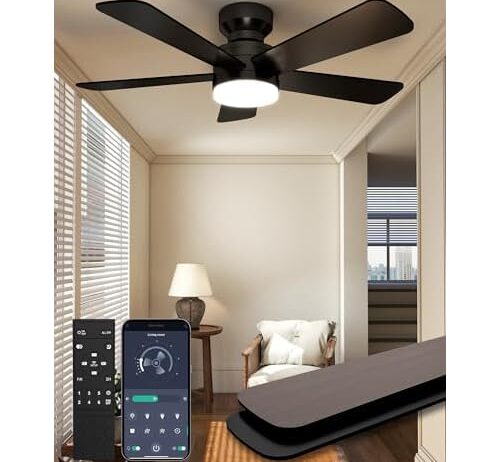
The practical value here is the six-speed DC motor at a price point where most fans offer three. Six increments let you step through the duty-cycle range in smaller jumps, which matters specifically for hum: if speed three buzzes, you move to two or four and the resonant frequency shifts enough to quiet it. On a three-speed fan, that option doesn’t exist.

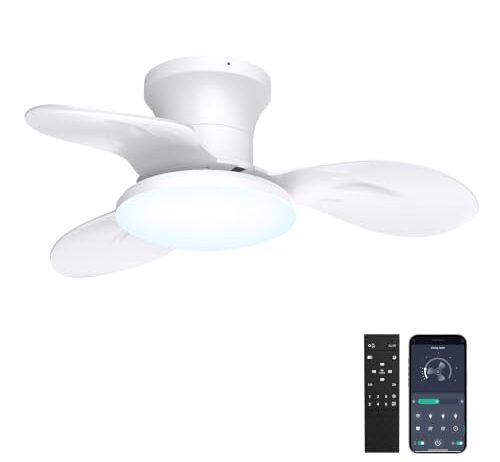
At 42 inches, the blade sweep covers rooms up to about 225 square feet — a standard bedroom or home office — without demanding mid-range speeds for adequate airflow. The reversible motor runs the same PWM controller in both directions, so switching from downdraft to updraft won’t change the hum character, only the aerodynamic sound of air moving differently around the blades. The light runs 3000K to 6000K with dimming, and critically, the dimmer circuit is separate enough that owners haven’t reported compounding buzz when both light and fan run mid-range — a real concern when PWM circuits share a housing.

One owner noted the fan seemed to have only two effective speeds — very slow and very fast — using the remote alone. The app may expose finer control than the physical remote’s buttons, which is worth checking before assuming all six speeds feel distinct.

Does Reversing the Fan Change the Hum?

No. A reversible DC motor uses the same PWM controller and switching frequency regardless of blade direction. Forward and reverse change which set of windings fires in which sequence, but the duty cycle — the thing that creates the hum — stays identical at any given speed setting.

What does change is the sound of the air. In downdraft mode, blades push air straight down and the column of moving air is concentrated below the fan. In updraft mode, air moves along the ceiling and circulates more gently. The aerodynamic noise — the whoosh — is softer in updraft because the air speed at any given point in the room is lower. This can make the PWM hum more noticeable, not because it got louder but because the masking noise dropped.

If the fan seems noisier in reverse, that’s what’s happening. The hum was always there; the blade noise was covering it.

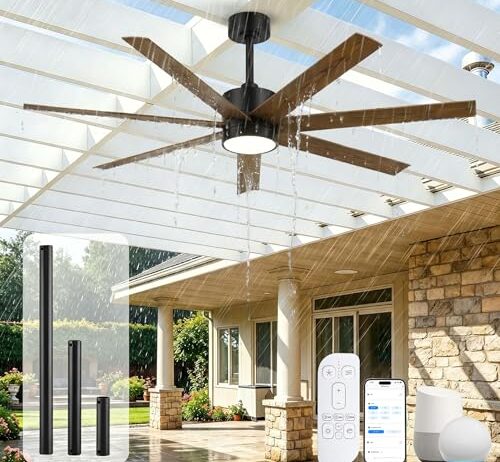
The argument for a 56-inch fan in a hum-sensitive setting is pure physics: more blade surface moves more air per revolution, so the motor runs at a lower duty cycle for any given comfort level. Lower duty cycle means less time in the 30-to-60 percent PWM switching range where resonance peaks. In a large living room or covered patio — the spaces this fan is sized for — it can deliver a noticeable breeze on its lowest settings while a 42-inch fan would need to run at medium.

The wet rating means a sealed, denser motor housing built to keep rain out. That same seal damps vibration. Seven blades instead of three or four distribute aerodynamic load more evenly, which reduces the turbulent whoosh that can either mask or compete with electrical hum depending on the frequency.

At $209 it’s the most expensive option here, and the size limits where it fits. One owner who installed two on a patio reported the light housings arrived cracked and questioned the gasket quality — the seal that’s supposed to protect electronics from moisture. That’s a QC concern worth checking on arrival, though it’s separate from the motor and noise question.

The Light Dimmer Problem

Ceiling fan lights that dim also use PWM — the same on-off switching trick, applied to the LED driver instead of the motor. If both circuits share a housing or a power supply, running the light at mid-brightness while the fan runs at mid-speed can produce two overlapping hum frequencies. Sometimes they cancel. Sometimes they reinforce. The result is unpredictable and varies unit to unit.

The safest approach is to run the light at full brightness or off, and adjust only the fan speed, when diagnosing a hum. If the hum disappears when the light goes to 100%, the dimmer circuit is contributing. If it stays, the motor is the sole source.

Fans that separate the light dimmer from the motor controller — physically, on different circuit boards — tend to avoid this interaction. You can’t tell from outside whether a fan does this. But a fan whose hum changes character when you adjust the light is telling you the circuits are coupled.

What App Control Actually Changes

A physical remote with six buttons gives you six speeds. An app connected over Wi-Fi or Bluetooth might expose the same six presets — or it might allow finer percentage-based control, letting you set 42% instead of choosing between 33% and 50%. That distinction matters enormously for hum avoidance, because the resonant band might be only a few percentage points wide.

The problem is that most fan apps don’t document whether they offer continuous control or just replicate the remote’s fixed steps. If the app shows a slider, try nudging it between the detents where the remote would land. If the fan speed changes smoothly, you have finer granularity. If it snaps to the nearest preset, you don’t — the slider is cosmetic.

Voice control through Alexa or similar platforms typically maps to the same fixed speed presets as the remote. Saying “set the fan to 40 percent” may round to the nearest available step rather than commanding a true 40% duty cycle. Useful for convenience, but unlikely to give you the micro-adjustment that dodges a specific resonant frequency.

Small Fans and the Mass Argument

A compact fan — 22 inches or under — has a smaller motor with less stator mass. Less mass means less material to resonate, which should reduce the amplitude of any magnetostriction hum. In theory. In practice, small fan motors often use lighter, thinner housings to keep the unit flush-mountable and unobtrusive, and a lighter housing is a better resonator. The motor makes a quieter hum; the housing amplifies it more. Whether the net result is quieter depends on the specific build.

Small fans also face a geometric penalty for airflow. A 22-inch fan covers about 380 square inches of sweep area. A 42-inch fan covers about 1,385 — more than 3.5 times as much. To move comparable air in the same room, the smaller fan has to spin significantly faster, which means the controller sits at a higher duty cycle more often. If the room is small enough that the 22-inch fan’s output is sufficient on a low setting, the hum advantage holds. If you’re pushing it to medium or high to compensate for size, you’re back in the resonant band.

The right use for a compact fan in a hum-sensitive context is a small room — a hallway, a bathroom, a walk-in closet — where the fan doesn’t need to work hard. One owner of a 22-inch model reported a motor that burned through its plastic housing after two weeks, which points to a unit running near capacity in a space that may have needed a larger fan.

FAQ

Why does my ceiling fan hum more at medium speed than at high or low?

The motor controller uses pulse-width modulation to regulate speed. At medium settings, the on-off switching pattern hits the motor housing’s resonant frequency, causing the metal laminations inside to vibrate audibly. At full speed the switching stops entirely — current flows continuously — and at very low speed the current is too weak to vibrate the housing noticeably.

Do ceiling fans with more speed settings make less noise?

They don’t reduce the hum itself, but they give you more options to avoid it. The resonant hum typically occupies a narrow band of duty cycles. A six-speed fan lets you step around that band more precisely than a three-speed fan, increasing the chance that at least one comfortable setting falls outside the noisy range.

Is the buzzing from my ceiling fan the motor or the light dimmer?

It can be either or both. Test by running the fan with the light fully on, then fully off. If the hum changes, the LED dimmer’s own PWM circuit is contributing. If it stays the same regardless of light setting, the motor is the sole source.

Does a bigger ceiling fan hum less because it spins slower?

Not inherently, but it spends less time in the speed range where hum is worst. A larger fan moves more air per revolution, so it can deliver comfortable airflow at a lower duty cycle — below the 30-to-60 percent range where PWM resonance peaks. A smaller fan working harder to move the same air sits in that range more often.

Does reversing a ceiling fan direction change the buzzing sound?

The electrical hum stays identical because the PWM controller uses the same switching frequency in both directions. But reverse mode produces less aerodynamic noise from the blades, which can make the underlying hum more noticeable by removing the masking sound.