We research every product we recommend. We may earn a commission from the links on this page.
Electronics › Minis

The Clock Speed on the Box Is the One You Won’t Get

We compare published specifications and marketplace data. We do not test these products.

Small Cases Throttle — What a Mini PC Actually Sustains
Photo by Andrey Matveev on Pexels

A 4.5 GHz boost clock runs for about ten seconds. Then the chip heats up, the chassis can’t move the heat out fast enough, and the processor pulls itself back to whatever speed keeps the temperature below 100°C. In a desktop tower with a 120mm fan and a fist-sized heatsink, that pullback is small. In a box the size of a paperback, it can cut sustained performance in half. Four mini PCs, four different thermal envelopes — and the fastest chip on the label is not necessarily the fastest one under load.

Affiliate disclosure: This article contains affiliate links. We may earn a commission if you buy through them, at no extra cost to you.

Everything we recommend
4 picks

Every x86 processor has a thermal ceiling — typically 95°C to 105°C at the die. Cross it and the chip cuts its own clock speed, dropping frequency in steps until heat output matches what the cooling system can actually remove. This is thermal throttling, and it is not a flaw. It is the mechanism that keeps a $500 chip from destroying itself.

In a full-size desktop, throttling rarely matters. A tower case has 15 to 30 liters of internal volume, room for a heatsink the size of a coffee mug, and one or two 120mm fans pushing air across it. A mini PC offers maybe a liter and a half. Same physics, a fraction of the space. The heat has to go somewhere, and there is less surface area to send it through and less air to carry it away.

That mismatch is the entire story of mini PC performance. The processor’s boost clock — the big number on the box — is its peak, achievable for seconds or minutes depending on the thermal solution. Sustained performance is whatever speed the chip can hold once the chassis reaches thermal equilibrium. For a 15-watt chip in a well-ventilated case, that gap might be trivial. For a 54-watt chip in the same size box, it can be dramatic.

How we picked

We did not run these machines. Selections are based on published specifications, processor thermal data from AMD and Intel, and category-level thermal engineering principles.

TDP range, not clock speed

A processor’s thermal design power determines how much heat the cooling system must remove continuously. We spread from 15W to 54W to show how wattage constrains sustained speed.

RAM type as thermal factor

LPDDR5 runs at 1.1V versus DDR4’s 1.2V. In a tight chassis, lower memory heat leaves more thermal headroom for the CPU.

Network hardware, not wireless alone

Dual 2.5GbE matters for always-on workloads where throttling costs uptime. A WiFi-only unit signals different intended duty.

Upgrade path, not just capacity

Soldered LPDDR5 locks you at purchase. SO-DIMM DDR4 lets you add RAM later. That distinction shapes the machine’s useful life.


What TDP actually tells you

Thermal Design Power is not peak power draw. It is the maximum sustained heat output a cooling system must handle — the number the heatsink and fan are sized to match. A processor rated at 45W TDP can draw more than 45 watts in a short burst, but if the cooler can only move 45 watts of heat, the chip will throttle back to that envelope within seconds.

The spread here runs from 15 watts to 54 watts. That is not a subtle range. A 54-watt processor at full load generates roughly three and a half times the heat of a 15-watt one. If both sit in the same size chassis with the same size fan, the 54-watt chip hits its thermal wall proportionally faster. More heat, same exit path, earlier throttle.

This is why a cheaper, older, lower-wattage processor can outperform a newer, faster one under sustained load in a small enclosure. The older chip never hits the ceiling. It runs at or near its rated speed all day because its cooling system was never asked to do more than it can handle. The newer chip sprints and then walks.

The cooling chain breaks at its weakest link

Heat leaves a CPU through a fixed chain: die to thermal paste to heatsink to air to outside. A bottleneck anywhere in that path limits the whole thing. In a full-size desktop, every link is oversized. In a mini PC, every link is marginal.

Heatpipes help. They use a fluid that evaporates at the hot end and condenses at the cool end, transferring heat 10 to 100 times more effectively than a solid copper slug of the same weight. A mini PC with heatpipes running from the CPU to fins near a case vent will sustain higher clocks than one with a small aluminum block sitting directly on the chip.

But the fan is where noise enters. A 40mm fan — the size you find in most mini PCs — has to spin at 4,000 to 5,000 RPM to move meaningful air. A 120mm desktop fan moves the same volume at 1,200 RPM. Noise scales with RPM. That whine you hear when a mini PC ramps up under load is the cooling system reaching its limit, and the sound is the tax on putting a fast chip in a small box.

None of the four machines here publish their cooling design — fan size, heatpipe count, airflow path. That information matters more than clock speed for predicting sustained performance, and you will not find it until the machine is on your desk and open.

RAM generates heat too

Memory is not thermally neutral. DDR4 runs at 1.2 volts. LPDDR5 runs at 1.1 volts. That difference sounds trivial, but in a chassis where every watt matters, the memory subsystem’s heat contribution shifts how much thermal budget the CPU gets.

LPDDR5’s lower voltage reduces heat output from the memory by roughly 10 to 15 percent under identical workloads. In a liter-and-a-half case, that freed wattage goes directly to the processor — meaning a few hundred more megahertz of sustained clock speed before the thermal ceiling arrives.

The trade-off is permanent. LPDDR5 is soldered to the board. Whatever capacity ships in the box is what you have for the life of the machine. DDR4 SO-DIMM modules slide into sockets and can be swapped or doubled later. You are choosing between a cooler-running memory subsystem that cannot grow and a warmer one that can.

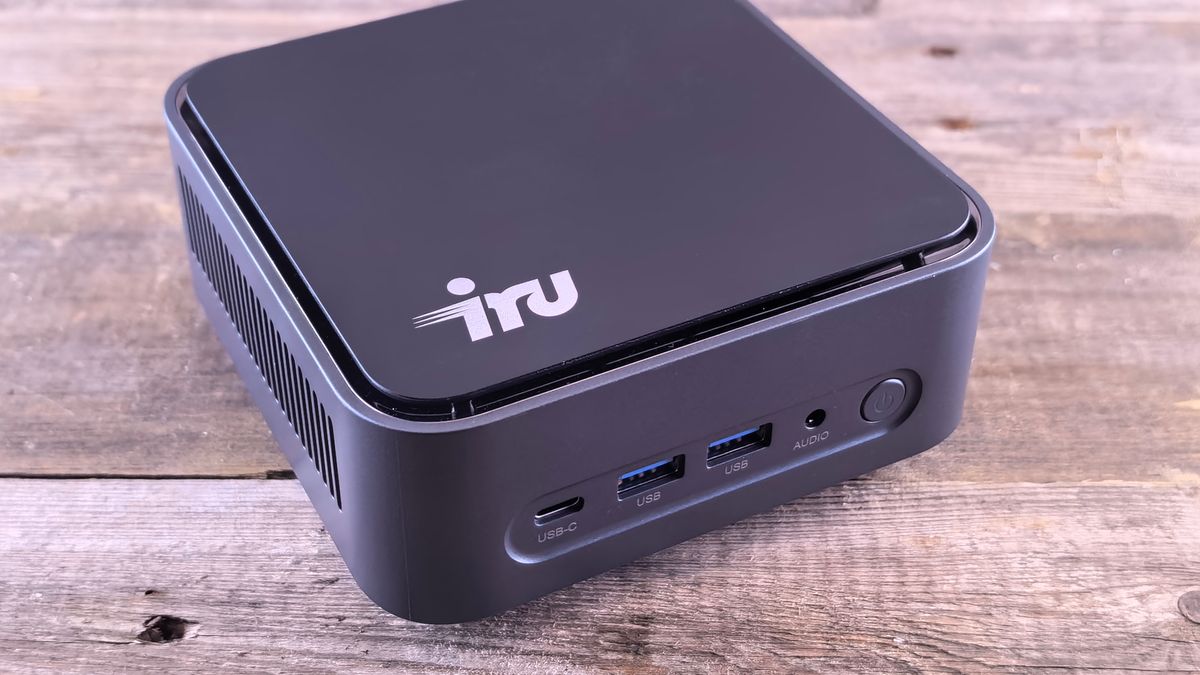
The i5-8257U is a 2018 chip. It is slower than every other processor here in a benchmark that lasts ten seconds. But its 15-watt TDP means the cooling system has to dissipate a quarter of the heat that a Ryzen 7 produces. In a chassis this small, that arithmetic matters more than the number on any single-run score.

Because the thermal load is lower, the fan — whatever size it is — spins slower. Slower fan means less noise. Less noise means you can leave this running on a desk all day without noticing it. For a home server, a media box, or an office machine doing browser and spreadsheet work, sustained quiet performance at moderate speed beats burst performance at high speed followed by fan noise and throttling.

DDR4 SO-DIMM slots let you upgrade to 64 GB later, and the storage bay takes up to 4 TB. The expansion path is real: start at 16 GB and 512 GB, add more when you need it. The LPDDR5 machines in this group cannot make that offer.

When wattage earns its heat

A 15-watt chip is not the right answer for everyone. If you compile code, render video, or run local AI models, you need the raw instruction throughput that a Ryzen 7 provides — even knowing it will throttle. A throttled 8745HS is still faster than an unthrottled i5-8257U for parallel workloads because it has more cores running at a higher floor speed.

The question is whether the workload is bursty or sustained. Bursty work — opening applications, loading web pages, short script executions — lives inside the boost window. The chip sprints, finishes, and cools before throttling matters. Sustained work — a forty-minute video encode, a long compile, a database migration — runs past the boost window and lives at whatever speed the cooling system permits.

If your work is bursty, buy the fastest chip you can afford. If your work is sustained, the cooling system matters more than the processor, and you cannot evaluate the cooling system from a feature list.

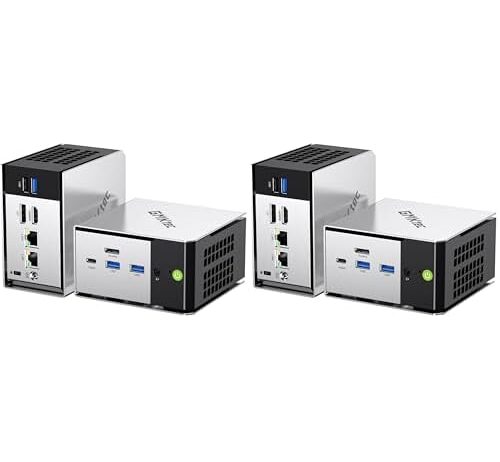
The GMKtec M8 ships as a pair. That is unusual for a consumer mini PC and it signals the intended use: two nodes behind a switch, running services where one can fail over to the other. Dual 2.5-gigabit ethernet on each unit supports link aggregation or separate network segments without adding a USB adapter.

The Ryzen PRO 6650H sits at 45 watts — high enough that thermal throttling under sustained load is a real concern for a 24/7 workload. But PRO-series processors include features aimed at managed fleets: memory encryption, remote management hooks, and longer platform support windows. If you are running a pair of these as a home Kubernetes cluster or a Proxmox hypervisor, those features matter more than peak clock speed.

Oculink and USB4 give each unit a path to external GPUs or fast NVMe enclosures. LPDDR5 is soldered at 16 GB per node — adequate for container workloads, tight for heavy virtual machines. The pack-of-two pricing works out to about $480 per unit, which is competitive with single machines at the same TDP class.

The network question

Two of these machines have dual 2.5-gigabit ethernet ports. Two rely on WiFi 6 alone. That split matters for different reasons than you might expect.

Dual ethernet is not primarily about speed for most home users. A single 2.5 GbE link already outpaces most internet connections and local file transfers. The second port exists for network separation — running your home network on one interface and a lab or IoT VLAN on the other — or for link aggregation, which requires a managed switch that supports LACP. Without that switch, the second port sits unused or serves as a failover.

WiFi 6 is adequate for a machine sitting on a desk doing desktop work. It is not adequate for a machine serving files to other devices on your network, because wireless latency is variable and throughput drops with distance and interference. If you plan to use a mini PC as a NAS, a media server, or anything that other machines connect to, wired ethernet is not optional. It is the baseline.

How to read the numbers before you buy

Ignore the boost clock. It is real, but it lasts seconds. Look at the base clock — the speed the manufacturer guarantees the chip can sustain within its thermal envelope. Then look at the TDP and ask yourself whether a box this small can dissipate that much heat continuously.

A 35-54W configurable TDP means the manufacturer can set the chip to run anywhere in that range. In a mini PC with marginal cooling, the OEM often configures the lower end of that range to keep temperatures manageable. You may be buying a 54-watt-capable chip running in a 35-watt configuration, which is fine — but it means the performance ceiling is lower than the processor’s maximum suggests.

Check whether RAM is soldered or socketed before you buy, not after. LPDDR5 in any configuration is permanent. If you need 32 GB in two years, you need a different machine. DDR4 SO-DIMM slots let you buy 16 GB now and 64 GB later, but the memory runs warmer and the processor gets marginally less thermal headroom.

And if sustained quiet matters — for a bedroom media server, a living room HTPC, anything within earshot for hours — a lower-TDP chip is buying you silence as much as it is buying you thermal stability. The two are the same thing.

FAQ

Do mini PCs with faster processors actually run slower than cheaper ones under sustained load?

They can. A high-TDP processor in a small chassis hits its thermal ceiling faster and throttles harder than a low-TDP chip that never approaches its limit. A 15-watt i5 holding steady at 3.2 GHz will finish a long task faster than a 54-watt Ryzen 7 that hits 4.5 GHz for ten seconds and then drops to 2.8 GHz for the rest.

What does TDP mean for a mini PC buyer?

TDP is the maximum sustained heat the cooling system must remove. A 45W TDP processor needs a cooler that can dissipate 45 watts continuously. If the mini PC’s fan and heatsink can only handle 30 watts, the chip throttles until its heat output drops to 30 watts — and your clock speed drops with it.

Can I upgrade the RAM in a mini PC with LPDDR5?

No. LPDDR5 is soldered directly to the motherboard during manufacturing. The capacity you buy is the capacity you keep. DDR4 SO-DIMM configurations use sockets and can be swapped or expanded after purchase.

Why does my mini PC get loud under load when it was quiet at idle?

Mini PCs use 40mm fans that must spin at 4,000-5,000 RPM to move enough air for cooling under load. At idle the chip generates little heat and the fan runs slowly or stops. Under sustained load the chip heats up, the fan ramps to maximum, and you hear it. The noise is the cost of fitting a high-wattage processor into a small case.

Is DDR4 or LPDDR5 better for a mini PC?

LPDDR5 runs at lower voltage (1.1V vs 1.2V), generating less heat and leaving more thermal headroom for the processor. DDR4 SO-DIMM runs warmer but sits in a socket you can upgrade later. If you need to expand memory in the future, DDR4 is the only option. If thermal performance matters more than upgradeability, LPDDR5 has a slight edge.

Do dual ethernet ports on a mini PC actually make the network faster?

Not by default. A single 2.5 GbE port already exceeds most home internet speeds. The second port is useful for network separation — running two VLANs on different interfaces — or for link aggregation, which requires a managed switch supporting LACP. Without that switch, the second port is a failover or a spare.