We research every product we recommend. We may earn a commission from the links on this page.
Baby Products › Video Monitors

Baby Monitor Night Vision Doesn’t Work Through Glass — Here’s the Physics

We compare published specifications and marketplace data. We do not test these products.

Infrared Night Vision Can't See Through Glass
Photo by Arturo Añez. on Pexels

Your baby monitor’s night vision turns a window into a mirror. Infrared LEDs bounce light off glass instead of illuminating the room beyond it, and the camera photographs its own reflection — a flat white wash where your child’s crib should be. The fix depends on understanding what infrared light actually does when it hits a glass surface, and why some monitor designs make the problem worse than others.

Affiliate disclosure: This article contains affiliate links. We may earn a commission if you buy through them, at no extra cost to you.

Everything we looked at
4 picks

How we picked

We do not install these monitors in nurseries. Selections draw from IR wavelength specifications, optical sensor ratings, and verified purchaser accounts of glare behavior.

IR wavelength, not brightness claims

940nm eliminates visible glow entirely; 850nm produces a faint red indicator. Both wavelengths reflect off glass identically, but one reveals camera position.

Dedicated signal vs. network dependency

Proprietary FHSS radio maintains connection without router involvement. WiFi monitors require stable home networks and expose video streams to broader attack surface.

Screen diagonal and native resolution

A 5.5-inch 2K display resolves fine detail at arm’s length. Smaller screens require interpolation or force you to squint at midnight.

Range spec and physical barriers

Advertised range assumes line-of-sight. Walls, floors, and appliances cut that number. Dedicated monitors state maximum distance; WiFi cameras depend on router placement.


What Infrared Light Does When It Hits Glass

Baby monitors see in the dark by flooding the room with light you can’t see. Infrared LEDs — tiny emitters built into the camera housing — throw out light at wavelengths between 850 and 940 nanometers. Your eyes register nothing. The camera’s sensor, stripped of the IR-blocking filter that normal cameras use, picks it up clearly.

Glass is the problem. At perpendicular incidence, a single glass surface reflects roughly 8% of infrared light back toward the source. A window has two surfaces — inside and outside — so the total reflection climbs higher. That reflected IR light is close, bright, and aimed directly back at the lens. The actual room beyond the glass is dark, lit only by whatever fraction of the IR made it through. The camera’s sensor can’t separate the two signals. The reflection wins.

This is why daytime works fine. Visible light passes through glass with minimal reflection relative to the ambient brightness outside. But at night, the IR LEDs are the only light source, and glass acts like a partial mirror pointed straight at them.

Angling the camera helps — a little. Tilt the lens 15 or 20 degrees off perpendicular and the specular reflection bounces away from the sensor instead of into it. But the LEDs are still the brightest thing in the camera’s field of view, and surface imperfections in the glass scatter some of that light back regardless of angle. You reduce the glare. You don’t eliminate it.

850nm vs. 940nm: The Glow You Can See and the One You Can’t

Most baby monitors use 850nm infrared LEDs. They work well — strong illumination, good sensor sensitivity, reasonable power draw. One side effect: 850nm sits close enough to the visible spectrum that the LEDs emit a faint red glow. In a dark nursery, you can see it. A dim constellation of red dots on the camera housing.

940nm LEDs push deeper into the infrared. No visible glow at all — the camera housing stays dark. That matters if you’ve got a toddler who fixates on the little red lights, or if you’re using the camera where a visible indicator is unwanted.

The trade-off is real, though. Silicon sensors — the CMOS chips inside these cameras — are less sensitive at 940nm than at 850nm. To get the same image brightness, a 940nm system needs roughly 30-40% more power driving the LEDs. That means either a larger battery drain, shorter effective range in the dark, or both. The image itself tends to be slightly noisier at distance.

For the glass reflection problem specifically, the wavelength difference is marginal. Both 850nm and 940nm reflect off glass at similar rates. The 940nm system doesn’t solve the window issue — it solves the visible-glow issue, which is a separate problem entirely.

WiFi vs. Dedicated Signal: Two Different Architectures

These monitors split into two camps, and the split matters more than resolution or screen size.

Dedicated monitors use their own wireless protocol — typically a 2.4 GHz signal with frequency-hopping, similar to DECT cordless phones. The camera talks to the parent unit directly. No router, no internet connection, no app, no cloud server. Range depends on the transmitter power and what’s between camera and screen: drywall is easy, concrete is hard, and a floor with radiant-heat tubing is nearly opaque to radio.

WiFi monitors route through your home network. The camera connects to your router, the signal goes out to a cloud service, and your phone pulls it back down. You can check the feed from anywhere — your office, a restaurant, another city. But you inherit every weakness of your WiFi network: congestion from other devices, dead zones, ISP outages, and the latency of a round trip through a server farm.

For night vision and glass reflection, the architecture doesn’t change the physics. IR bounces off glass the same way regardless of how the video reaches you. But the architecture does change what you can do about it. A dedicated monitor with a 1860-foot range lets you put the camera almost anywhere in a house and still get signal. A WiFi camera needs to stay within range of your router — which might mean fewer options for positioning the camera away from that window.

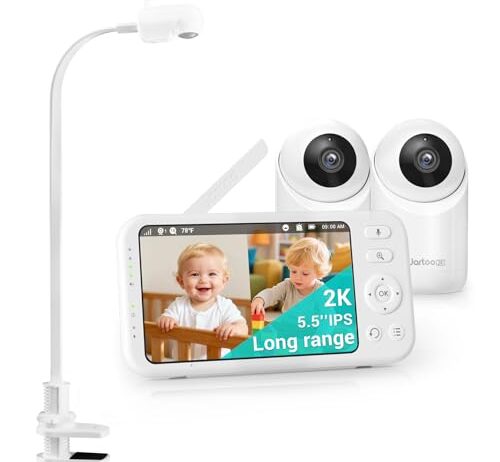
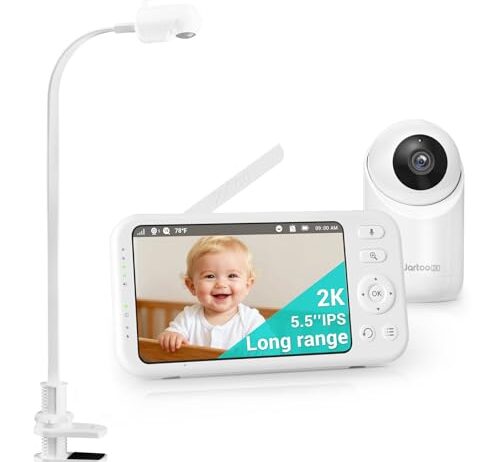
The Jartoo single-camera monitor runs on its own wireless signal with no WiFi dependency. That 1860-foot range means the camera can go wherever the nursery layout demands — centered on the crib wall, angled down from a shelf, mounted high in a corner — without worrying about router proximity. The 6000mAh battery on the parent unit keeps the screen running through the night without being tethered to a charger on your nightstand.

The 5.5-inch screen is large enough to leave on a dresser across the room and still see detail — you’re not squinting at a phone-sized display in the dark. At 2K resolution, the night vision image holds up well even when the IR illumination isn’t perfect. This is a camera you position once, aim carefully away from any glass surfaces, and then don’t touch again. The dedicated signal means no firmware updates interrupting your feed at 2 AM, no cloud outage taking the monitor offline, and no password to remember.

What it doesn’t do: no remote access from outside the house, no phone app, no cloud recording. If you need to check the nursery from work, this isn’t the tool. It’s a monitor that does one job — showing you the crib from the next room — and does it without depending on anything except its own radio signal.

Why the Camera Ends Up Near a Window in the First Place

Nobody plans to aim a baby monitor at glass. It happens because nurseries have constraints.

The crib goes against an interior wall, away from windows, because that’s the safe-sleep guidance. The camera needs to see the crib from above and at an angle. The best vantage point is often the opposite wall — which, in a room with one door and two walls of closet, might be the window wall. You set the camera on the windowsill because it’s the right height and the right angle. Daytime test looks perfect. You go to bed.

The other common scenario: a camera doing double duty. The nursery adjoins a backyard or a driveway, and you want to see both the crib at night and the yard during the day. During daylight, the camera sees through the glass fine. After dark, the IR LEDs activate and the glass becomes a wall of white.

Dual-camera systems multiply the odds. With two cameras to position, the chance that one ends up near glass — a patio door, a hallway window, a glass-paneled interior door — roughly doubles. You might get the nursery camera right and discover the problem with the second camera covering the hallway.

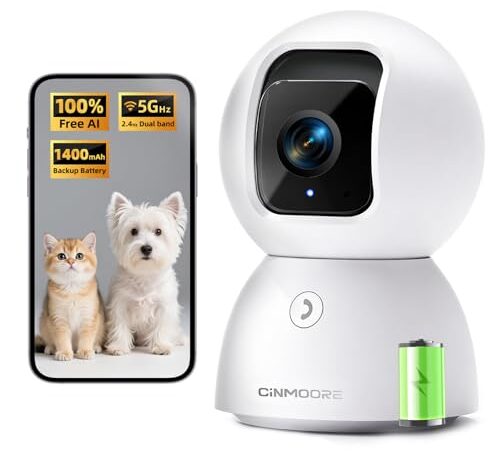
The CINMOORE camera uses 940nm infrared LEDs — the 0-Glow type that produce no visible red light. In a dark room, the camera housing is invisible. That’s a genuine advantage when a curious toddler stares at the red dots on a standard monitor and refuses to sleep, or when you’re using the camera in a shared space where a visible indicator is distracting.

At 3K (5MP) resolution on 5G WiFi, this is the sharpest image in the set, but there’s no dedicated screen. Everything goes through your phone. That’s a deliberate trade-off: you lose the always-on parent unit sitting on your nightstand, and you gain the ability to check the feed from anywhere with a cell signal. The backup battery keeps the camera running through a power outage — useful if your area loses power during storms and you need the monitor most when the house goes dark.

For the glass reflection problem, 940nm doesn’t help — infrared reflects off glass at both wavelengths about equally. But the phone-app-only design means you’re already used to flexibility. There’s no base station tethering you to a specific room. If the camera’s current position catches glare, you move it. The lack of a dedicated screen is the cost; the freedom to reposition without worrying about signal range to a parent unit is the benefit.

What Actually Fixes Night Vision Glare

There is no baby monitor that sees through glass at night using infrared. The physics doesn’t allow it. But there are workarounds, ranked by how well they actually work.

Move the camera. This is the real fix. Get the lens away from glass entirely — even 18 inches back from a window changes the geometry enough that the reflected IR light scatters wide instead of hitting the sensor directly. A wall-mounted position on the same wall as the window, aimed across the room, eliminates the problem completely because the glass is behind the camera.

Press the camera flat against the glass. If you must monitor through a window — watching a driveway, a pool gate — pressing the camera housing flush against the glass with a suction mount reduces the air gap where reflection occurs. It doesn’t eliminate reflection from the far surface of the glass, but it cuts the total glare significantly. This works better with single-pane glass than double-pane, where the air gap between panes creates its own reflection layer you can’t eliminate.

Disable night vision and add ambient light. A dim nightlight or a low-wattage bulb gives the camera enough visible light to produce a usable image without activating the IR LEDs at all. The image will be warmer-toned and softer than IR night vision, but there’s no reflection to fight. Whether this works depends on whether the light disturbs the child — a red or amber nightlight in the 5-10 lumen range is usually enough for the camera sensor without being bright enough to disrupt sleep.

Angle the camera. Tilting 15-20 degrees off perpendicular sends the main specular reflection away from the lens. You’ll still get some scattered IR return, but the flat white wash becomes a manageable haze. This is a compromise, not a solution — and it changes the camera’s field of view, which might mean losing sight of part of the crib.

Screen Size, Resolution, and What You Actually See at 3 AM

Resolution numbers — 1080p, 2K, 3K — describe how many pixels the camera captures. Screen size determines how large each pixel appears to your eye. The two interact.

A 2K image on a 5.5-inch screen gives you sharp detail at arm’s length. You can see whether the baby’s eyes are open, whether the pacifier fell out, whether the blanket shifted. The same 2K image on your phone’s 6.5-inch screen looks similar — slightly larger, slightly less pixel-dense, but functionally the same.

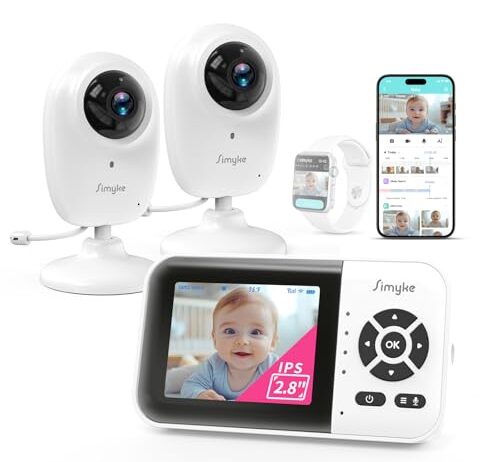
A 1080p image on a 2.8-inch screen is a different experience. At that size, 1080p is more than enough resolution — you couldn’t see the extra pixels of 2K on a screen that small even if they were there. But the screen itself is small enough that you’re holding it close to your face or squinting across a nightstand. It’s portable — genuinely fits in a pocket — but it’s not something you glance at from across the room.

The 3K phone-only option has no physical screen at all. Your phone is the monitor. That’s the sharpest image in the set when you’re looking at it, and completely invisible when your phone is locked or charging face-down. Dedicated monitors win on presence: they’re always showing you the feed, always on, always visible. Phone apps win on resolution and remote access. Neither wins on both.

FAQ

Why does my baby monitor show a white screen at night near a window?

The camera’s infrared LEDs are bouncing light off the glass surface. Glass reflects roughly 8% of infrared light per surface, and since the LEDs are inches from the glass, that reflected light is far brighter to the sensor than anything beyond the window. Move the camera at least 18 inches from the glass, or reposition it so no glass is in front of the lens.

Can I use a baby monitor to see through a glass door at night?

Not with IR night vision active. The infrared light reflects off the glass and washes out the image. Pressing the camera flush against the glass reduces the effect but doesn’t eliminate it, especially with double-pane glass. Disabling night vision and adding a low-wattage ambient light on the other side of the door is more reliable.

Does 0-Glow night vision solve the glass reflection problem?

No. 0-Glow means the LEDs use 940nm infrared instead of 850nm, which eliminates the visible red dots on the camera housing. Both wavelengths reflect off glass at similar rates. The 0-Glow feature solves a different problem — visible LED indicators that can distract a child or signal the camera’s location.

Will tilting my baby monitor camera reduce night vision glare?

Tilting 15-20 degrees off perpendicular sends the strongest reflection away from the lens, reducing the white-out to a haze. It helps but doesn’t fix the problem entirely — scattered infrared light from glass surface imperfections still reaches the sensor. Moving the camera away from the glass works better than angling it.

Is it better to turn off night vision and use a nightlight instead?

It works. A dim red or amber nightlight in the 5-10 lumen range gives the camera enough visible light to produce a usable image without activating IR LEDs. The image looks warmer and softer than infrared, but there’s no glass reflection to fight. Whether it’s practical depends on whether the light disturbs the child.