We research every product we recommend. We may earn a commission from the links on this page.
Electronics › Keyboard & Mouse Combos

Membrane Keyboard Switches Wear Out Differently Than You Think

We compare published specifications and marketplace data. We do not test these products.

Membrane Keyboards Lose Their Click Because the Dome Plastic Yields
Photo by Matheus Bertelli on Pexels

A rubber dome keyboard switch can register a keystroke long after it stops feeling like one. The dome flattens over millions of presses — the electrical contact still closes, but the snap is gone. That gap between “working” and “feeling right” is where most keyboards quietly retire, and understanding the polymer fatigue behind it changes how you shop for a combo set.

Affiliate disclosure: This article contains affiliate links. We may earn a commission if you buy through them, at no extra cost to you.

Everything we recommend
4 picks

How we picked

We did not type on these keyboards. Judgements come from published specifications, switch technology, and owner feedback.

Switch material, not switch label

Rubber domes fatigue. Metal springs don’t — not on any human timescale. We sorted by what’s inside.

Silence method, not silence claim

Softer dampening polymers wear faster. How a switch achieves quiet determines how long the quiet feels good.

Owner-reported feel over time, not day-one impressions

Reviews describing inconsistency or mushiness after use reveal dome fatigue in progress.

Connection reliability, not feature count

Wireless dropout mimics tactile loss — a missed keystroke feels the same regardless of cause. Owners who report both need separation.
The Dome Collapses Twice — Once by Design, Once by Wear

Every membrane keyboard works by buckling. A silicone or rubber dome sits under each keycap, and when you press down, the dome collapses past its critical point — a sudden snap that drives two conductive traces together on the circuit board below. That snap is the tactile bump. It’s an engineering feature, not a side effect: the dome stores elastic potential energy and releases it at the buckling point, giving your fingertip a binary signal that the key fired.

The problem is in the material. Rubber and silicone are viscoelastic polymers. Under repeated cyclic loading, their modulus drops and permanent deformation accumulates — a process called stress relaxation. The dome doesn’t crack or tear. It flattens. The buckling force decreases, the energy differential at the snap point shrinks, and the force curve smooths out into something your finger reads as mush.

This happens to every membrane switch eventually. The timeline varies — five to ten million presses is a common range for noticeable degradation — but the physics doesn’t. And it’s temperature-dependent: body heat from your fingertips and ambient warmth accelerate the polymer chain reorganization that drives creep. A keyboard on a hot desk in summer degrades faster than the same board in a cool room.

The key that still registers but no longer feels crisp isn’t broken. It’s a dome that has lost enough elastic recovery to flatten the tactile curve below your perception threshold.

Why Some Keys Go Soft Before Others

Your spacebar, E, and backspace get hit orders of magnitude more than your F9. That’s why tactile loss shows up unevenly — the most-used keys fatigue first, while lesser-used keys still feel new. It’s the same dome, same rubber compound, same circuit board. The only variable is cycle count.

This uneven wear is what makes dome fatigue confusing. If every key went mushy simultaneously, you’d recognise the board as worn out. When three keys feel different from the rest, it reads as a defect — something wrong with those specific switches. It’s not. It’s the logarithmic relationship between cycle count and permanent set playing out across a keyboard where usage isn’t uniform.

One owner of the Rapoo combo described a spacebar that works intermittently — “youendupwithwords allrunning together” — while other keys typed fine. That pattern, where the highest-traffic key degrades first, is consistent with dome fatigue progressing at different rates across the board. Whether the root cause in that case was the dome, the contact geometry, or something else entirely, the symptom is what every membrane user eventually recognises: the key you hit most is the first one that stops feeling right.

Silent Switches Wear Faster — Here’s the Trade

Silence in a membrane switch comes from the same place as the problem. Softer elastomer dampeners absorb the impact noise when the dome bottoms out, and softer polymers lose elastic recovery faster under repeated compression. The quieter the switch, the more compliant the material, and the shorter the path to tactile loss.

That creates a genuine dilemma. The keyboards people buy specifically because they’re quiet — for shared offices, for late-night use, for video calls — are the ones most susceptible to the fatigue that makes them feel worse over time. And because they start soft, distinguishing factory-soft from early-stage-degraded is nearly impossible without a new unit for comparison.

This is the buyer friction that shows up in forums constantly: “Is it supposed to feel like this, or is it worn out?” On a clicky mechanical switch, the answer is obvious — the click is either there or it isn’t. On a silent membrane, the feel was always subtle, and the transition from subtle to gone is gradual enough that you question yourself before you question the hardware.

Low-Profile Changes the Math, Not the Outcome

A low-profile keyboard has shorter key travel — typically 2–3 mm versus 3.5–4 mm on a standard board. That means each press deflects the dome less. Less strain per cycle should extend dome life, and in pure material terms it does: smaller deflections accumulate permanent set more slowly.

But there’s a catch. Shorter travel also means less elastic margin. The dome doesn’t have to flatten as far before the remaining snap becomes imperceptible. You’re starting closer to the threshold where tactile loss becomes noticeable, even if you’re approaching that threshold more slowly.

Think of it as two clocks running at different speeds toward finish lines at different distances. The low-profile dome cycles more gently but has less room to degrade before you feel it. Whether that nets out to a longer or shorter useful life depends on the specific elastomer, the dome geometry, and how sensitive your fingers are — but “low-profile lasts longer” isn’t the straightforward win it sounds like.

Metal Springs Don’t Have This Problem

Mechanical switches replace the polymer dome with a metal coil spring or leaf spring — tempered steel alloys with a high yield strength and elastic limit. These springs resist fatigue failure for tens of millions of cycles because the deformation stays elastic: the metal returns to its original shape without accumulating permanent set.

That’s not a quality difference. It’s a material-class difference. Elastomers are viscoelastic — they creep and relax under load by design, which is what makes them quiet and soft in the first place. Metals are elastic within their working range — they don’t creep, which is what makes them consistent but louder.

Brown mechanical switches specifically deliver tactile feedback without the audible click. A small bump in the slide mechanism provides the same finger-knows-it-fired signal that a dome’s buckling point gives you, except the mechanism doesn’t degrade. The bump is the same on press one and press ten million. That consistency is the real argument for mechanical boards — not the sound, not the aesthetics, but the fact that the feel you buy is the feel you keep.

The trade-off is noise. Even without a click, a brown switch bottoming out on a plate is louder than a rubber dome absorbing its own impact. New mechanical users coming from silent membrane boards sometimes mistake normal bottom-out sound for a defect, which is its own kind of buyer friction — just pointed in the opposite direction.

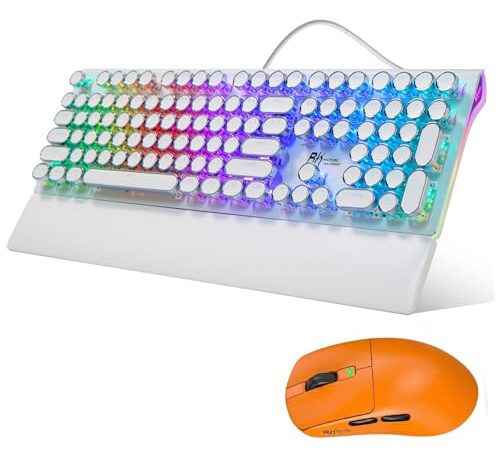
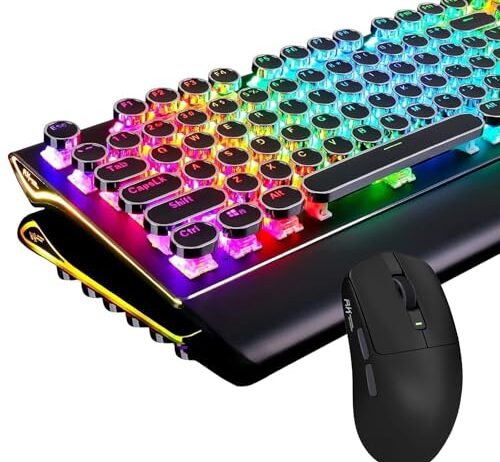
The RK Royal Kludge S108 pairs a wired mechanical keyboard with a 43 g wireless mouse. The keyboard uses brown switches — a tactile type that provides a physical bump at the actuation point without an audible click. That bump comes from a metal leaf mechanism, not a polymer dome, so the force curve stays the same whether you’re on day one or year three.

The retro round keycaps add key travel height on top of the switch’s own travel, which means your fingers move further per press. That’s a preference split: touch typists who learned on low-profile chiclet boards find it fatiguing, while people who grew up on tall keyboards find it natural. What it isn’t is a durability variable — the keycap shape doesn’t affect the spring inside.

The mouse at 43 g is light enough that wrist fatigue drops measurably during long sessions. It connects wirelessly via 2.4 GHz, Bluetooth, or USB-C, while the keyboard stays wired — a split that keeps the keyboard’s latency at zero and the mouse’s cable out of the way.

When Wireless Dropout Looks Like Dome Fatigue

A missed keystroke feels the same regardless of cause. Your finger pressed, the letter didn’t appear, and you can’t tell whether the dome failed to make contact or the wireless signal dropped. On a wired keyboard the ambiguity doesn’t exist — if a key stops registering, it’s the switch. On wireless, you’re troubleshooting two failure modes simultaneously.

Multiple owners of the Rapoo 9010M describe exactly this confusion. One reports the keyboard missing characters at 15 feet from the PC, noting it “seems like the accuracy improves” when the board is held up in the air — a signal-path symptom, not a switch symptom. Another describes the spacebar failing intermittently in a pattern that could be either dome contact or Bluetooth dropout. When the connection itself is unreliable, dome fatigue becomes invisible behind a noisier failure.

This matters for diagnosis. If your wireless membrane board starts feeling inconsistent after a year, the honest answer is that you can’t isolate the cause without plugging it in — and most wireless-only boards don’t have a wired fallback. A combo that offers both connections, or a wired keyboard paired with a wireless mouse, gives you one fewer variable to untangle when something stops feeling right.

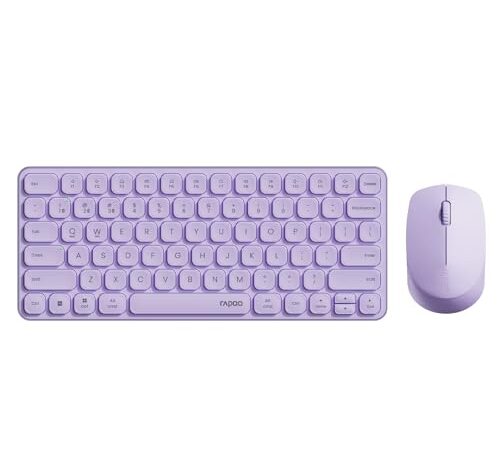
The Rapoo 9010M is a low-profile silent membrane combo that pairs with up to four devices via Bluetooth 5.0, Bluetooth 4.0, and 2.4 GHz. The multi-device switching works by keystroke — press two keys and you’re on a different computer. That convenience is genuine and hard to find at twenty dollars.

The silent click switches use soft elastomer dampeners to absorb bottom-out impact. Those dampeners are what makes the board quiet, and they’re the component most susceptible to the polymer fatigue this article is about. Expect the tactile feel — already subtle on day one — to degrade sooner than on a board with stiffer domes. The low-profile design means less deflection per press, which slows the wear, but also less elastic margin before the softening becomes perceptible.

Owner feedback surfaces a pattern worth noting: the keyboard’s multi-device switching works as described, but the mouse does not switch between devices — it connects to one only. If multi-device operation for both peripherals is the reason you’re buying a combo, this set delivers half of that promise. That’s a connectivity limitation, not a switch-wear issue, but it’s the kind of thing that gets conflated when frustration accumulates.

A Wrist Rest Won’t Tell You the Dome Is Going

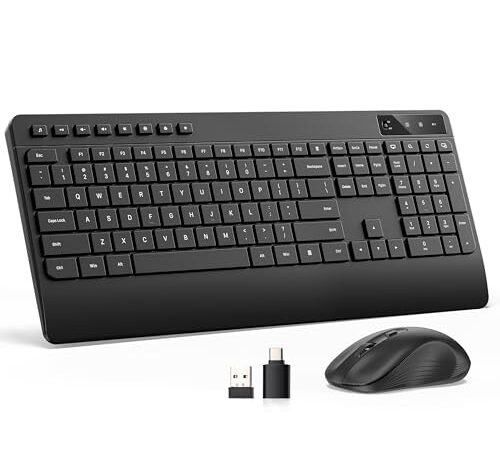
The Hamile combo includes a full-size keyboard with an integrated wrist rest. A wrist rest reduces the extension angle at your wrist, distributing pressure away from the carpal tunnel — that’s a genuine ergonomic benefit independent of what switch type sits underneath.

But it introduces a masking effect. As domes fatigue and flatten, the force curve changes: some keys may require slightly more effort to actuate consistently, while others bottom out with less resistance. A wrist rest absorbs some of the postural compensation your hands would otherwise make in response to those changes, delaying the moment you consciously recognise that the board feels different.

That’s not a criticism of wrist rests. It’s a note about the diagnostic value of discomfort. On a bare desk, a fatigued dome changes how your hand loads the key, and you notice the strain shift. On a padded rest, the same shift is cushioned out, and the first thing you consciously register might be typos from keys that no longer actuate cleanly — a symptom one step further down the degradation curve.

One owner of the Hamile described the keys as “absolutely flat and not dished at all,” making it hard to keep fingers on home row without looking. That’s a keycap shape issue, not a dome issue, but it illustrates how tactile ambiguity compounds: when you already can’t feel key centers, feeling dome degradation on top of that becomes nearly impossible.

Fixing a Mushy Key Is Fixing the Wrong Problem

You can open a membrane keyboard, remove the rubber dome sheet, and wash or reshape individual domes. People do this. The internet is full of tutorials. And it mostly doesn’t work — because the deformation is in the polymer chains, not on the surface. You’re trying to reverse stress relaxation with soap and a hair dryer, and the material doesn’t forget its fatigue history.

Replacing individual domes is theoretically possible but practically absurd on most consumer boards. The dome sheet is a single moulded piece with dozens of domes in a grid. You can’t swap one dome without cutting the sheet and gluing in a replacement, and the replacement’s response curve won’t match its neighbours.

The honest answer: a mushy membrane key is a consumed part. The board still works — it will keep registering keystrokes long after the feel degrades — and whether that’s acceptable depends on whether you type by feel or by confirmation on screen. A touch typist who relies on tactile feedback to keep speed without looking will notice dome fatigue months before a hunt-and-peck user who watches each letter appear.

FAQ

How long do membrane keyboard switches last before they feel mushy?

Most rubber dome switches begin to lose noticeable tactile feedback somewhere between five and ten million presses on a given key. Your spacebar, E, and backspace will get there years before your F-row keys because usage isn’t uniform. The switch still works electrically well beyond that point — the mushiness is the dome losing elastic recovery, not the circuit failing.

Do mechanical keyboards avoid the mushy feeling that happens with rubber dome switches?

Yes. Mechanical switches use metal springs — typically tempered steel — that stay within their elastic range for tens of millions of cycles. The tactile bump comes from a physical mechanism in the slide, not from a polymer dome, so it doesn’t degrade through the same stress relaxation process. The feel you get on day one is the feel you keep.

Can I fix a keyboard key that has lost its tactile bump?

Not practically. The softening is permanent polymer deformation at the molecular level — the rubber dome has taken a set and won’t spring back. You can clean the dome sheet or try reshaping it, but the material’s stress history doesn’t reverse. On most consumer membrane boards the dome sheet is one moulded piece, so replacing a single dome means cutting and splicing. If the feel matters to you, replacing the board is more realistic than repairing it.

Why does my wireless keyboard feel inconsistent — is it the connection or the switches?

It could be either, and on a wireless membrane board you can’t easily tell. A Bluetooth dropout and a dome that barely makes contact produce the same result: a press that doesn’t register. The diagnostic move is to plug in via USB if the board supports it. If the inconsistency disappears on a wire, the problem is signal. If it persists, the domes are likely fatiguing unevenly across high-use keys.

Does a silent keyboard wear out faster than a regular one?

The silence comes from softer elastomer dampeners, and softer polymers lose elastic recovery faster under cyclic compression. So yes — a silent membrane switch will generally reach perceptible tactile degradation sooner than a stiffer dome, all else equal. The trade-off is real: quieter on day one, mushier sooner.