We research every product we recommend. We may earn a commission from the links on this page.
Electronics › Minis

Mini PC Bottom Vents and Summer Heat: What Actually Throttles Your Machine

We compare published specifications and marketplace data. We do not test these products.

Small Cases Throttle — What a Mini PC Actually Sustains
Photo by Andrey Matveev on Pexels

A mini PC pulls air through vents on its bottom panel, passes it over a heatsink, and exhausts warm air out the side or back. Set that box flat on a desk in a 78°F room in July and you’ve closed the intake. The fan still spins. It just recirculates the same warm air until the processor hits its thermal limit and starts cutting its own clock speed — or shuts down entirely. The difference between those two outcomes, and how little it takes to prevent both, is what this piece is about.

Affiliate disclosure: This article contains affiliate links. We may earn a commission if you buy through them, at no extra cost to you.

Everything we recommend
4 picks

How we picked

We have not opened these machines or run thermal tests on them. Picks are based on processor specifications, port configurations, and owner-reported thermal behavior.

Processor heat, not clock speed

A newer architecture at higher wattage produces more heat under sustained load — the variable that matters when airflow is restricted.

Cooling clues, not marketing

Dual Ethernet, USB4, and Oculink suggest always-on or high-throughput duty. Sustained load is where thermal design matters most.

Owner thermal reports, not star counts

Reviews describing shutdowns, throttling, or airflow workarounds carry more signal than an aggregate rating.

Upgrade path, not box specs

Soldered RAM locks you into what shipped. Socketed RAM and expandable storage let you add capacity without adding a second heat source.

Why does a mini PC overheat when it’s sitting flat on a desk?

The short answer: you blocked the intake.

Most mini PCs use active cooling — a small fan pulling outside air through vents, across a finned aluminum heatsink bonded to the processor, and out the other side. Copper heat pipes move thermal energy from the chip’s die to those fins, and airflow carries it away. The whole system depends on one thing: cooler air getting in.

When the intake vents sit on the bottom panel and the case rests on a flat surface, the gap between the vent and the desk is whatever the factory feet provide — often 2 to 4 millimeters, sometimes less. That’s not enough. The fan builds static pressure trying to pull air through a near-closed path, but even a high-static-pressure fan can’t overcome a near-complete blockage. It keeps spinning. It just moves the same trapped air in a circle.

Component temperatures climb. The processor’s thermal sensors see junction temperatures approaching the safe ceiling — typically 95 to 105°C on modern x86 chips — and the firmware starts cutting performance to shed heat.

What’s the difference between thermal throttling and a thermal shutdown?

Throttling comes first. It happens in steps.

The processor drops its boost clock — the high speed it runs at when thermal headroom exists. If temperatures keep climbing, it drops to base clock. Still too hot, it starts reducing voltage. Each step lowers performance and lowers heat output, and on a light workload that’s often enough to stabilize. You might notice a video call getting choppy or a file transfer slowing down, but the machine stays on.

Shutdown is the last resort. When throttling can’t reduce temperatures fast enough — because the workload is too heavy, or the airflow is too restricted, or both — the processor hits its critical junction temperature and the firmware cuts power to prevent permanent damage to silicon. No warning dialog. No save prompt. Black screen.

The tricky part: throttling can be invisible. A machine doing light office work may throttle its boost clock and you’d never notice — it just runs at a speed that’s still fast enough. The same machine running a sustained compile, a long video transcode, or a gaming session hits that same thermal wall much harder because the workload demands consistent high clock speeds. That’s why two owners of the same machine can disagree completely about whether it overheats.

Why is this worse in summer?

Convective heat transfer — the mechanism that carries heat from the heatsink to the air — depends on the temperature difference between the fin surface and the incoming air. A heatsink at 90°C with 20°C air coming in has a 70-degree delta. That same heatsink with 30°C air has a 60-degree delta. The fan hasn’t changed. The heatsink hasn’t changed. But 14% less heat leaves per second.

In a full-size desktop tower with 200mm of clearance above the CPU cooler, that 10-degree shift in ambient temperature is manageable. In a mini PC with a volume under one liter, there’s almost no thermal mass to absorb the difference. The processor reaches its throttle threshold faster, spends more time throttled, and hits shutdown sooner under sustained load.

A machine that ran fine on your desk all winter can start shutting down in June. Nothing broke. The room got warmer and the margin disappeared.

How much clearance actually fixes it?

Third-party thermal testing of small-form-factor PCs shows that elevating a chassis 10 to 15 millimeters above a flat surface restores 60 to 80 percent of unobstructed airflow when bottom vents are the primary intake. That’s the height of two stacked pencils, or a set of adhesive rubber bumper feet from any hardware store.

Below 10mm, you get diminishing returns — the gap is too narrow for the fan to draw sufficient volume. Above 15mm, additional height helps only marginally because the restriction is no longer the dominant thermal bottleneck; the heatsink’s own capacity becomes the limit.

The practical fix is cheap. A four-pack of 12mm adhesive silicone feet costs two to four dollars. Stick them on the four corners of the bottom panel, and the machine is elevated enough to breathe. Some owners use bottle caps, rubber erasers, or short standoffs — anything that creates a stable platform with clearance underneath.

One owner of the Getorli (B0H2HMLHCM) reported stopping crashes entirely by flipping the unit upside down — a crude solution that moved the bottom vents to the top where rising warm air could escape freely. It worked, but it also means all the ports face up, which is awkward for cable management. Proper feet achieve the same thermal result without rearranging your desk.

Does a faster processor overheat faster?

Yes, but not linearly. A processor’s thermal output under load tracks with its power consumption, which is a function of clock speed, voltage, and how many transistors are switching. A 2024 Zen 4 chip running at full boost draws more power and produces more heat than a 2018 8th-gen Intel at its ceiling — but the Zen 4 chip also has a higher thermal ceiling before throttling begins, and a more aggressive throttling curve that sheds heat faster.

The practical effect: a higher-wattage modern processor gives you more performance before throttling, but when it does throttle — because the vents are blocked and the room is 82°F — the drop is steeper and more noticeable. An older, lower-power chip may throttle sooner in absolute terms but the performance loss is smaller because it was never running as fast.

This matters for workload planning. If you’re running a mini PC as a home server or NAS that idles most of the time and occasionally spikes for a file transfer, a lower-wattage processor with good airflow management is more thermally stable than a high-wattage chip in a sealed enclosure. If you need sustained performance — video editing, compiling code, running virtual machines — the thermal design of the enclosure matters more than the peak speed of the chip inside it.

Can laptop cooling pads help? What about flipping the case?

Laptop cooling pads are designed for flat-bottomed devices with intake vents facing downward — which is exactly what a mini PC with bottom vents is. The catch is size. Most cooling pads are 14 to 17 inches wide, built for laptop footprints. A mini PC sits in one corner and the rest of the pad’s fans blow into empty air. It works, but you’re powering a USB fan array to cool a surface area the size of a sandwich. A set of rubber feet does the same job for the relevant surface.

Flipping the case onto its side is more interesting. It moves the bottom vents to a vertical plane where they’re never obstructed by a surface, and warm air rises naturally away from a vertical intake. The downsides: the case wasn’t designed to rest on that face, so it may be unstable; ports that were on the back are now on top or bottom; and any internal components mounted with gravity in mind (spinning hard drives, if present) may not like the new orientation. With an NVMe SSD and no moving parts, orientation doesn’t affect the drive. Stability is the real concern — a top-heavy mini PC on its narrow side will fall over the first time you tug a cable.

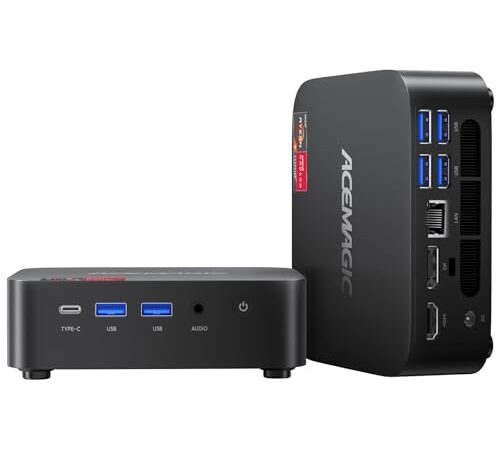
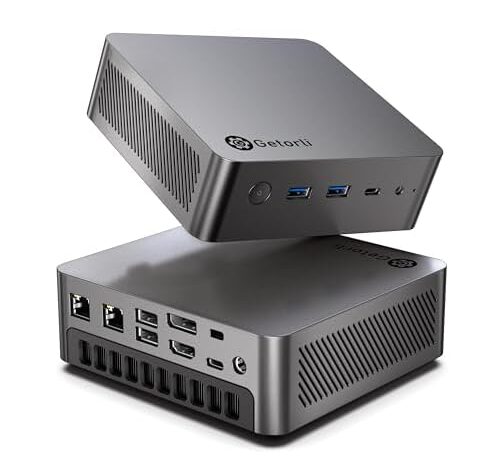
The Getorli runs an AMD Ryzen 7 8745HS, a Zen 4 part from 2024 with Radeon 780M integrated graphics. That integrated GPU shares the same thermal solution and power budget as the CPU, so a gaming session or GPU-accelerated render heats both at once. Dual 2.5-gigabit Ethernet ports suggest this machine can pull network-server duty — the kind of always-on workload where bottom-vent blockage becomes chronic rather than occasional.

One owner reported stopping repeated crashes by flipping the unit upside down — a direct confirmation that the stock orientation restricts airflow enough to cause instability under load. Another owner described WiFi and Bluetooth failures out of the box requiring a hardware re-seat, plus ongoing crashes and green screens during audio workstation use. The thermal behavior here is consistent with what the Zen 4 architecture demands: give it air and it performs; starve it and it protects itself aggressively. Sixteen gigabytes of DDR5 and a 500GB NVMe SSD are modest for the processor class, but both are socketed standards that allow upgrades without replacing the board.

What about always-on machines — servers, NAS boxes, 24/7 workloads?

This is where thermal design stops being a convenience issue and becomes a reliability question. A mini PC running as a home server or network-attached storage node stays powered and processing around the clock. In winter, the room might sit at 65°F and the machine idles comfortably. In August, that same room hits 80°F with afternoon sun, and a sustained backup job or Plex transcode pushes the processor into a thermal zone it never saw six months ago.

The dual-Ethernet models in this category are explicitly built for network-heavy roles — routing, firewalling, serving files across two separate subnets. That’s always-on duty by definition. If the chassis sits flat in a media cabinet or on a shelf with no clearance below, summer is when you discover whether the cooling design has margin or whether it was riding the edge all along.

Passive convection — heat rising through unpowered vents — moves far less air than an active fan. But when the fan is pulling against a blocked intake, its effective airflow drops toward passive levels anyway. The machine is running an active cooling system at passive cooling performance, which is the worst of both worlds: fan noise with convection-level heat removal.

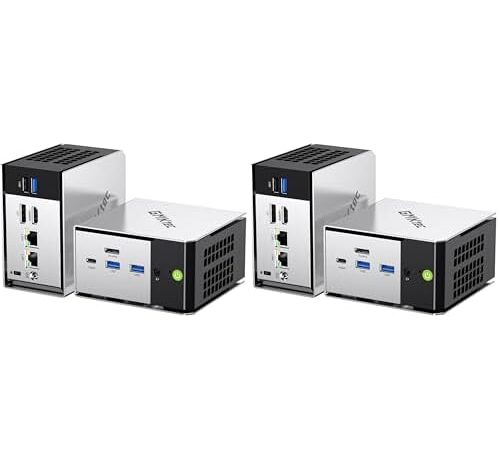
The GMKtec M8 runs an AMD Ryzen PRO 6650H — a 2022 Zen 3+ part with six cores and twelve threads, boosting to 4.50 GHz. The PRO designation means AMD’s enterprise-grade platform features: memory encryption, remote management hooks, and extended availability commitments. This is a workstation-class processor in a mini PC chassis, which is exactly the combination where thermal clearance determines whether you get workstation-class reliability or consumer-grade frustration.

The dual 2.5-gigabit Ethernet ports make this a candidate for pfSense routing, NAS duty, or running as a lightweight virtualization host. Oculink provides a direct PCIe connection for an external GPU enclosure if you need more graphics power than the integrated Radeon 660M offers. The pack-of-two pricing at $960 total puts each unit at $480 — the lowest per-unit cost in this set — and having two identical machines simplifies failover setups. Sixteen gigabytes of LPDDR5 is soldered and fixed, so plan your memory needs at purchase. The 512GB PCIe SSD is workable for an OS drive but light for a NAS role; budget for external storage.

The processor generation gap matters more than you think

Six years separate the oldest and newest chips in this group. That’s not just a performance gap — it’s a thermal behavior gap.

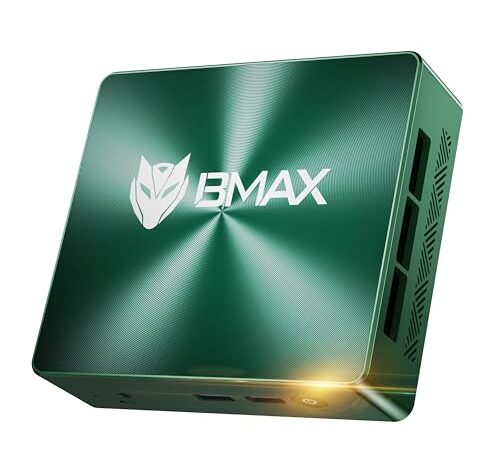
The 2018 Intel Core i5-8257U was designed for thin-and-light laptops at a 15W base TDP. It runs cool by modern standards but also runs slowly. Owners of the Bmax B6 Turbo describe it as sluggish — one says it performs worse than a ten-year-old machine, another returned it immediately as too slow for basic work tasks. That’s not a thermal problem; it’s a raw performance problem. The chip isn’t overheating because it never works hard enough to generate serious heat. But it also doesn’t have the headroom to do anything demanding, which means the mini PC form factor — designed around compactness and quiet — is wasted on a processor that was already behind when it shipped in a 2024 product.

The 2022 Zen 3+ chips (Ryzen 7 7735HS and Ryzen PRO 6650H) sit in the middle: more heat than the old Intel, more performance to show for it, and thermal protection systems that are well-understood after two years in the field. The 2024 Zen 4 (Ryzen 7 8745HS) pushes the hardest and runs the hottest, but architectural improvements mean it does more useful work per watt — if you keep it fed with cool air.

FAQ

Do mini PCs with bottom vents overheat if you don’t use a stand?

They can. When bottom vents sit flat against a desk, the fan recirculates warm internal air instead of pulling in cool air from outside. Whether that causes throttling or a full shutdown depends on the workload and room temperature. Light tasks like web browsing may never trigger it; sustained loads like video transcoding or gaming will.

How much clearance does a mini PC need under the case?

Third-party thermal testing of small-form-factor PCs shows 10 to 15 millimeters of clearance restores 60 to 80 percent of unobstructed airflow. Adhesive rubber bumper feet in that height range cost a few dollars and solve the problem for most setups.

Can you tell from the specs whether a mini PC has bottom vents or side vents?

Usually not. Vent location is rarely disclosed in product specifications or photos. If you’re buying online, look for owner photos or reviews mentioning airflow direction. Some owners discover bottom-intake designs only after thermal problems appear.

Will a mini PC overheat faster in summer?

Yes. Higher ambient temperature reduces the temperature difference between the incoming air and the heatsink, which lowers the rate of heat transfer. A machine with just enough thermal margin at 68°F may start throttling at 80°F under the same workload, with no hardware change.

Do laptop cooling pads work with mini PCs?

Functionally yes — they lift the device and blow air upward. Practically, most cooling pads are sized for 14 to 17 inch laptops, so most of the fan area blows past a mini PC entirely. A set of adhesive rubber feet provides equivalent clearance for the actual footprint at a fraction of the cost.