We research every product we recommend. We may earn a commission from the links on this page.
Electronics › On-Dash Cameras

Why Your Dash Cam Keeps Eating SD Cards

We compare published specifications and marketplace data. We do not test these products.

Why Your Dash Cam Stops Recording on Hot Days
Photo by Kyle Loftus on Pexels

A parked car’s cabin reaches 70°C on a sunny day, and the windshield — where your dash cam mounts — is the hottest surface inside. That temperature is well above the point where lithium-ion batteries stop accepting a charge. Whether your camera keeps recording through summer depends on three things: what stores its power, how many pixels it encodes, and where it draws electricity when the engine is off.

Affiliate disclosure: This article contains affiliate links. We may earn a commission if you buy through them, at no extra cost to you.

Everything we recommend
4 picks

How we picked

We do not mount these cameras in vehicles. Judgements rest on chipset thermal limits, battery chemistry specifications, and transfer-rate measurements from verified purchasers.

Operating temperature, not features

Supercapacitors tolerate 85°C; lithium-ion batteries fail at 60°C. We ranked cameras by their documented continuous-operation ceiling and storage technology.

Bitrate, not resolution claims

4K at 15Mbps delivers less detail than 1080P at 20Mbps. We compared encoded bitrates to determine which cameras preserve usable license-plate clarity.

Total cost, not sticker price

A camera bundled with a high-endurance card costs less over two years than one requiring separate card replacement. We factored replacement intervals into pricing.

Transfer speed, not protocol version

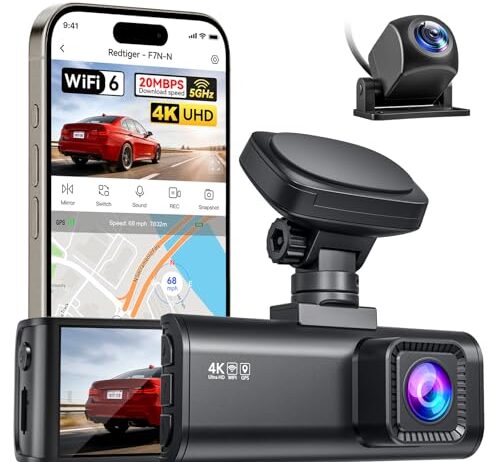
WiFi 6 runs slower than 5GHz ac in the metal-enclosed cabin environment typical of parked transfers. We evaluated real-world throughput, not spec maximums.


Three Ways a Dash Cam Keeps Running — and Two of Them Fail in Heat

Every dash cam needs stored energy to handle the moment between turning off the ignition and losing 12V power. How it stores that energy determines whether it survives a summer afternoon on your windshield.

Lithium-ion batteries are the most common. They’re cheap, hold enough charge for extended parking recording, and work perfectly in a climate-controlled office. Inside a parked car, they have a problem: charge controllers disable charging when cell temperature exceeds roughly 45°C. That’s a safety feature — charging a hot lithium cell risks thermal runaway and internal short circuits from dendrite formation. The protection circuit isn’t broken when it shuts down your camera. It’s doing exactly what it should.

Supercapacitors take a different approach. They store energy electrostatically rather than chemically, which means heat doesn’t degrade them the same way — they’ll operate at 85°C and above. The trade-off is capacity. A supercapacitor holds enough charge for 30 to 60 seconds after power loss. That’s enough for an orderly shutdown and file save. It is not enough for parking surveillance.

Hardwired installations bypass onboard energy storage entirely. A hardwire kit connects the camera to the vehicle’s 12V system through a low-voltage cutoff module — a small circuit that monitors battery voltage and disconnects the camera when it drops below 11.8 to 12.2 volts, preventing the kind of drain that leaves you with a car that won’t start. The camera draws power from a source that doesn’t care about cabin temperature, because the vehicle battery sits under the hood or in the trunk, not on the windshield.

What Resolution Actually Costs You

A 4K sensor captures frames at 3840×2160 pixels. A 2.5K sensor captures at roughly 2560×1440. That’s about 3.7 million more pixels per frame the processor has to encode — more computational work, more heat generated by the chip doing that work, all inside a small plastic housing pressed against glass that’s already absorbing direct sunlight.

The resolution difference matters for one specific job: reading license plates at distance. A 4K camera resolves characters on a plate several car lengths farther than a 2.5K camera can. If you mostly need footage to establish what happened in an accident — which car moved where, who ran the light — 2.5K captures that clearly.

Higher resolution also writes more data per second to the SD card. 4K footage at reasonable bitrates requires sustained write speeds of at least 30 MB/s, which means a minimum of a UHS-I U3 or Class 10 card. Push a slower card into a 4K camera and you get dropped frames, corrupted files, or both — and the card runs hotter from the sustained write load, which compounds the heat already coming through the glass.

None of this means 4K is wrong. It means 4K costs something beyond the purchase price, and that cost shows up as heat and storage wear.

Two Cameras vs. Three: What the Interior Channel Is For

A two-channel dash cam records front and rear. A three-channel model adds a lens pointed at the cabin interior. The question is whether that third channel earns its keep for how you actually use the camera.

Interior recording matters in two scenarios. Ride-share and delivery drivers need a record of what happens inside the vehicle — disputes, damage, incidents. And parking surveillance where someone might break into the cabin needs a camera that can see inside, not just outside.

For most commuters, two channels cover what insurance and law enforcement care about: what happened in front of you and what happened behind you. The third channel adds processing load, generates more heat, and writes more data to the card. If you don’t have a specific reason to record the cabin, you’re spending thermal budget on footage you’ll never review.

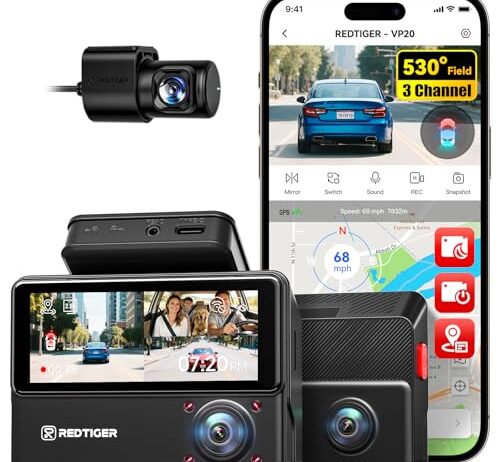
Interior cameras also need a different sensor strategy for night recording. Visible light inside a parked car at night is close to zero. IR LEDs solve this — they flood the cabin with infrared light invisible to the human eye but bright to the camera sensor. Without IR, the interior channel captures black frames after dark, which is exactly when parking surveillance footage matters most.

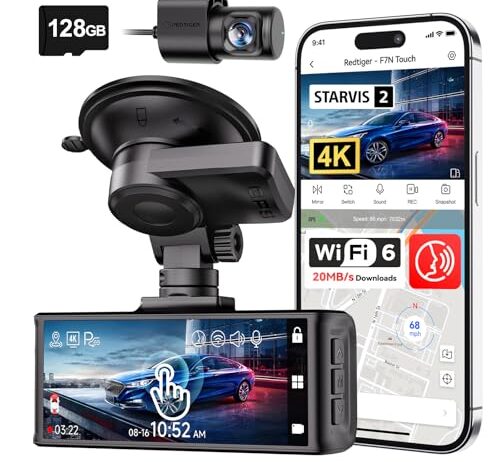
The included 128GB card is doing real work here. At 4K recording rates, a smaller card fills up faster and begins overwriting older footage sooner — meaning the clip you need from three days ago may already be gone. 128GB buys you meaningful buffer time before the loop recording erases what you haven’t downloaded.

The STARVIS 2 sensor is designed for low-light sensitivity, which means better night footage without relying on the camera’s own processing to brighten a dark image. That’s a hardware advantage — no amount of software brightening recovers detail the sensor didn’t capture in the first place. Paired with 5GHz WiFi, you can transfer clips to your phone at 20MB/s without pulling the card, which matters when the camera is hardwired behind trim panels and the card slot isn’t easily accessible.

SD Cards Die Faster Than You Think

An SD card has a finite number of write cycles — typically between 10,000 and 100,000 depending on the grade. A dash cam doing continuous loop recording writes to every cell on that card repeatedly, all day, every day. At 4K bitrates, you’re pushing 30 MB/s sustained writes for hours at a time.

Heat accelerates the degradation. Flash memory cells retain data through trapped electrical charges, and heat gives those charges enough energy to leak through the insulating oxide layer. A card rated for 100,000 cycles at 25°C might manage a fraction of that at 65°C. The failure mode isn’t dramatic — you don’t get an error message. Files silently corrupt. Clips you thought you recorded come back unreadable.

High-endurance cards exist specifically for this use case. They use different flash cell architectures — MLC or pSLC instead of standard TLC — that tolerate more write cycles and handle heat better. They cost two to three times what a standard card costs. That premium is worth it if the alternative is discovering your camera recorded nothing useful on the day it mattered.

This is the camera to look at if parking mode is the reason you’re buying a dash cam in the first place. The hardwire kit with voltage monitoring means the camera draws from the vehicle’s 12V system and disconnects itself before draining the car battery. That architecture sidesteps the entire lithium-ion heat problem — the camera doesn’t need its internal battery to stay running while parked.

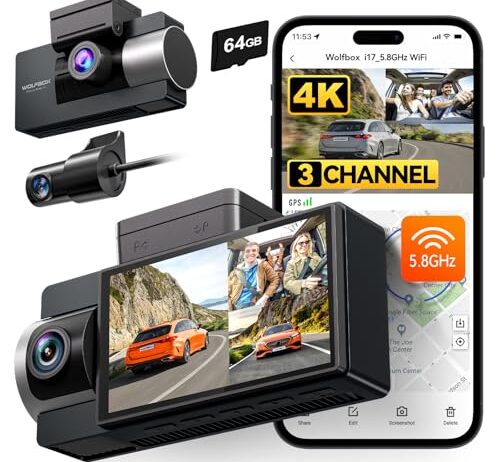
Three channels at 4K front, 1080P rear, and 1080P interior give you coverage of what happens outside and inside the cabin. The IR night vision on the interior camera means the cabin channel actually captures usable footage after dark, not just black frames. WDR processing is included for handling contrast between a bright windshield and a shadowed dashboard. The 64GB included card is smaller than the 128GB you’ll find elsewhere, so a high-endurance upgrade is worth considering if you’re recording across three channels continuously.

WiFi Transfer: 5GHz vs. WiFi 6 in a Metal Box

Both 5GHz WiFi and WiFi 6 (5.8GHz) claim 20MB/s transfer speeds, and under ideal conditions they deliver close to that. Inside a car, conditions are not ideal.

A vehicle cabin is a metal enclosure with windows. The metal reflects and absorbs radio signals. Your phone sits in your hand or on your lap, inches from the camera’s WiFi module, which helps — but metal door pillars, headliner materials, and window tinting all affect signal quality. The advertised speed is what you get in open air. Real-world transfer inside the car will be lower.

WiFi 6 handles multi-device congestion better than WiFi 5 through a technology called OFDMA, which divides the channel into smaller sub-channels. If you’re transferring footage while your phone is also connected to your car’s Bluetooth and streaming music to the stereo, WiFi 6 manages that traffic more cleanly. For a single device pulling files from the camera with nothing else competing, the practical difference is small.

The real convenience question is whether you’ll actually use WiFi transfer at all. If the camera is mounted cleanly with the card slot accessible, popping the card into a laptop is faster for large downloads. WiFi transfer earns its keep when the camera is hardwired behind trim pieces and the card slot is buried.

Deciding What You Actually Need

Start with the parking question. If you need the camera to record while the car sits in a lot for eight hours in July, you need a hardwire kit and a camera that explicitly supports parking mode with voltage monitoring. An internal lithium battery won’t keep a camera running through a hot afternoon — that’s physics, not a product flaw.

Then count your channels. Two covers driving incidents — front and rear, which is what matters for insurance claims and accident documentation. Three adds interior coverage, which matters for ride-share drivers, fleet vehicles, or parking security where cabin intrusion is a concern. Don’t pay the thermal and storage cost of a third channel you won’t use.

Resolution follows from what you need to capture. License plates at distance need 4K. General scene recording — who moved where, what happened — works fine at 2.5K with less heat, less storage consumption, and less SD card wear. And whatever resolution you choose, budget for a high-endurance SD card rated for the sustained writes and temperatures a dash cam demands. The card that ships in the box will work. Whether it’ll still work in eight months depends on where you park.

FAQ

Will my dash cam stop recording in a hot car?

If it uses a lithium-ion battery, it may. Charge controllers disable charging above roughly 45°C to prevent thermal runaway, and a parked car’s cabin regularly exceeds 70°C in summer. The camera powers on fine once things cool down, but you lose footage during the hottest hours — exactly when parking lot incidents tend to happen.

Do I need a hardwire kit for parking mode?

In warm climates, yes. A hardwire kit draws from the vehicle’s 12V battery through a low-voltage cutoff, bypassing the dash cam’s internal battery entirely. Without one, parking mode depends on onboard energy storage that heat can disable. The cutoff module prevents the camera from draining your car battery below starting voltage.

Does 4K recording make a dash cam run hotter?

It adds processor heat from encoding more pixels per frame and writes more data to the SD card, which generates additional heat from sustained high-speed writes. The difference is measurable, not dramatic — but in a camera already sitting on a hot windshield, any additional heat generation matters.

How long do SD cards last in a dash cam?

Standard cards may fail within months under continuous recording in hot conditions. High-endurance cards using MLC or pSLC flash are designed for this workload and last significantly longer. Heat accelerates cell degradation regardless of card grade, so parking in shade or using a windshield sunshade extends card life along with camera life.

What’s the difference between a supercapacitor and a battery in a dash cam?

A supercapacitor tolerates heat above 85°C but stores only enough energy for a 30-to-60-second orderly shutdown. A lithium battery holds more charge for extended recording but stops accepting charge above 45°C. Supercapacitors keep the camera alive long enough to save the current file; batteries attempt to power extended parking recording but fail in heat.